System Design
-
It involves taking a problem statement, breaking it down into smaller components and designing each component to work together effectively to achieve the overall goal of the system.
-
Steps for approaching a system design:
- Understand the problem
- Identify the users and their needs, as well as the constraints and limitation
- Identify the scope of the system
- Define the boundaries, what the system will do and what it will not
- Research & analyze existing systems
- Create a HLD
- outline main components & how they interact with each other
- rough diagram or flow chart
- Refine the design
- Document the design
- Continuously monitor and improve the system
- Understand the problem
-
Design Pattern
-
A software design patten is a general, reusable solution to a commonly occuring problem within a given context in software design
-
The steps go like this:
- Product Requirement Doc
- Features/Abstract Concepts
- Data Definitions
- Objects
- Data Base
-
-
Process should be reasonable as well. For example, we don't want to stream the actual resolution ie say 8K video directly to the viewers. It's impractical. We need to downgrade or transform it to some res better suited for streaming.
-
Abstraction should be there for the end user. They don't necessarily need to know about the process, they need the end result. So, abstract away the problem.
-
Testing should be at every step: edge cases, common cases, specific cases.
Tip
Extensibility: a measure of the ability to extend a system and the level of effort required to implement the extension
- Less coupling, more cohesion. Then its easy to scale and extend as and when requirements change
Chapter 1
Databases & DBMS
- Database is an organized collection of structured information/data, typically stored electronically in a computer system.
- Controlled by DBMS
- DBMS serves as an interface between the database and its end-users or programs, allowing users to retrieve, update, and manage how the information is organized and optimized
Components
-
Schema: shape of a data structure and specifies what kind of data goes where
-
Table: various cols in a spreadsheet
-
Column: set of values of a particular type
-
Row: data is recorded in rows
Types

Challenges
Common challenges faced while running db at scale:
- Absorbing significant increases in data volume
- Ensuring data security
- Keeping up with demand
- Fault Tolerant
SQL
- sql db is a collection of data items with pre-defined relationships b/w them.
- organized as set of tables with cols & rows
- each row in a table could be marked with a unique identifier called PK & there can also be a FK.
- Follow ACID
Materialized Views
- A materialized view is a pre-computed data set derived from a query specification and stored for later use. Because the data is pre-computed, querying a materialized view is faster than executing a query against the base table of the view.
- This performance difference can be significant when a query is run frequently or is sufficiently complex.
N+1 Query problem
-
The N+1 query problem happens when the data access framework executed N additional SQL statements to fetch the same data that could have been retrieved when executing the primary SQL query.
-
The larger the value of N, the more queries will be executed, the larger the performance impact. And, unlike the slow query log that can help you find slow running queries, the N+1 issue won’t be spotted because each individual additional query runs sufficiently fast to not trigger the slow query log.
-
Commonly seen in GraphQL and ORM
-
Can be optimized by batching requests
Disadvantages
- Expensive to maintain
- Difficult schema evolution
- Performance hits (joins, denormalization)
NoSQL
-
Unlike in relational databases, data in a NoSQL database doesn't have to conform to a pre-defined schema.
-
broad category; includes:
- Document DB (MongoDB, DocumentDB)
- Key-Value (Redis, DynamoDB)
- Graph DB (GraphQL, NeptuneDB)
- uses graph structures for semantic queries with nodes, edges and properties to store data
- edges represent relationships b/w the nodes
- use-cases: Fraud detection, recommendation engines, social network
- Time-Series DB
-
Follow BASE
SQL vs NoSQL
- Storage
- Schema
- Querying (SQL vs different syntax)
- Scalability
- SQL: vertically scalable, can get expensive
- NoSQL: horizontally scalable
- Reliability
- SQL wins
- Data Intensive/High IO workloads
- NoSQL wins
ACID vs BASE
-
ACID
- ATOMIC
- CONSISTENT
- ISOLATED
- DURABLE
- Where reliability and consistency are essential
-
BASE
- Basic Availability
- db appears to work most of the time
- Soft-state
- db repicas or stores dont have to be mutually consistent all the time
- Eventual Consistency
- data might not be consistent immediately but given sufficient time, it becomes consistent.
- where scalability and HA are essential
- Basic Availability
DB Replication
Replication is a process that involves sharing information to ensure consistency between redundant resources such as multiple databases, to improve reliability, fault-tolerance, or accessibility.
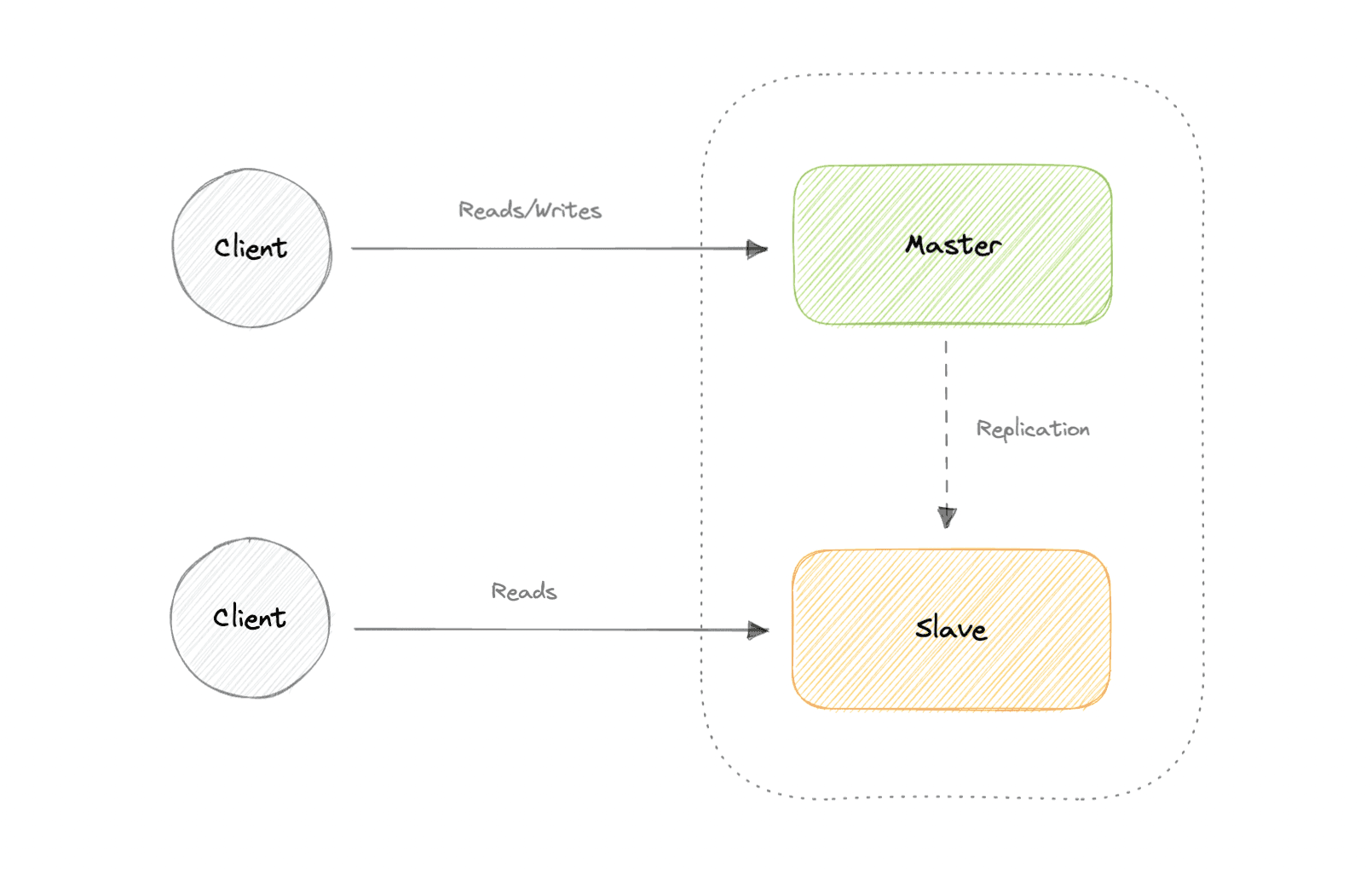
Master-Slave Replication
-
If the master goes offline, the system can continue to operate in read-only mode until a slave is promoted to a master or a new master is provisioned.
-
Advantages
- Backups of the entire database of relatively no impact on the master.
- Applications can read from the slave(s) without impacting the master.
- Slaves can be taken offline and synced back to the master without any downtime.
-
Disadvantages
- Replication adds more hardware and additional complexity.
- Downtime and possibly loss of data when a master fails.
- The more read slaves, the more we have to replicate, which will increase replication lag.
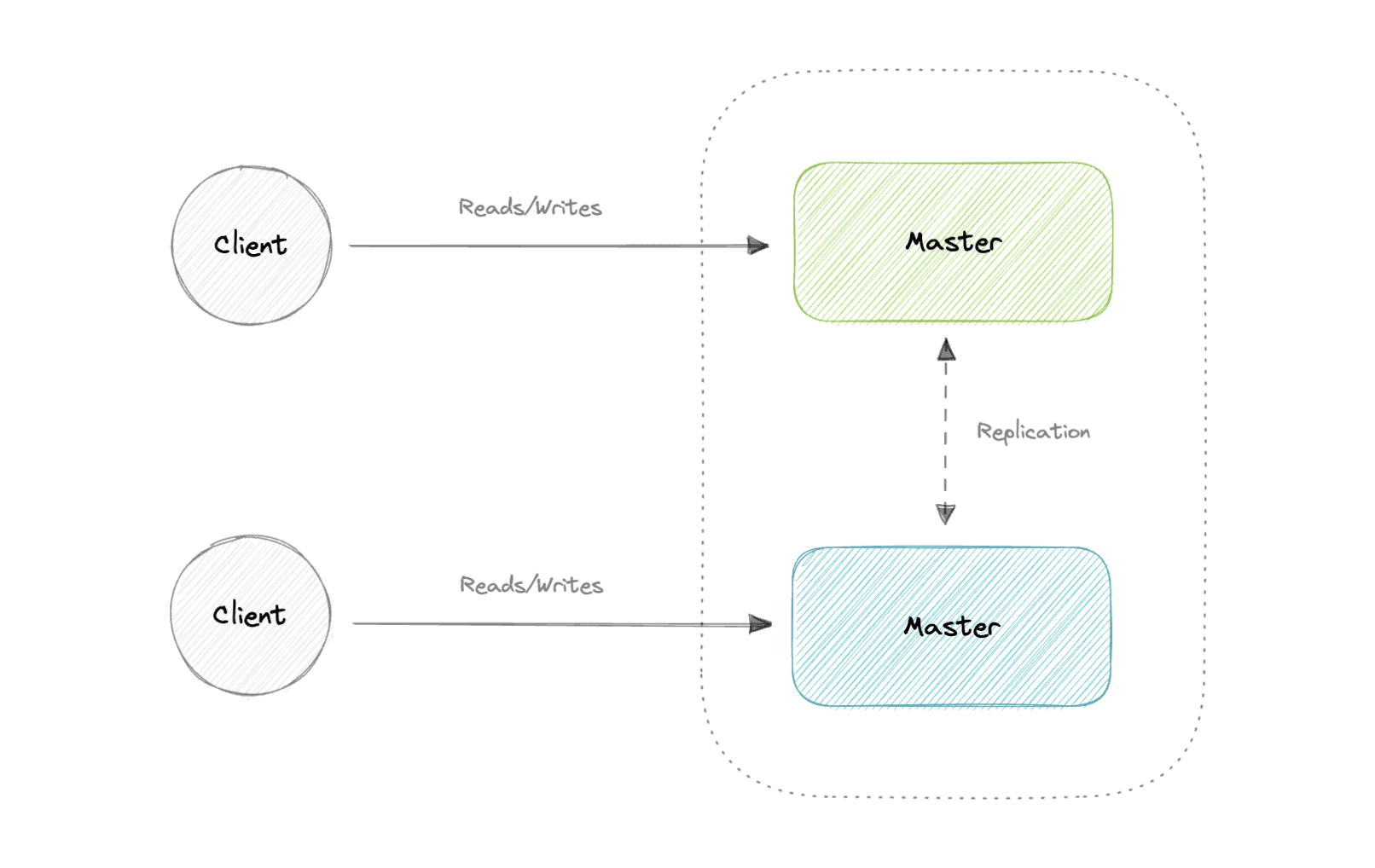
Master-Master Replication
-
Advantages
- Applications can read from both masters.
- Distributes write load across both master nodes.
- Simple, automatic, and quick failover.
-
Disadvantages
- Not as simple as master-slave to configure and deploy.
- Conflict resolution comes into play as more write nodes are added and as latency increases.
Synchronous vs Asynchronous Replication
- how the data is written to the replica
- In synchronous replication, data is written to primary storage and the replica simultaneously.
- asynchronous replication copies the data to the replica after the data is already written to the primary storage. Although the replication process may occur in near-real-time, it is more common for replication to occur on a scheduled basis and it is more cost-effective.
Indexes
- they are used to improve the speed of data retrieval operations on the data store
- trade-offs of increased storage, slower writes (not only have to write the data but also update the index) for the benefit of faster reads
-
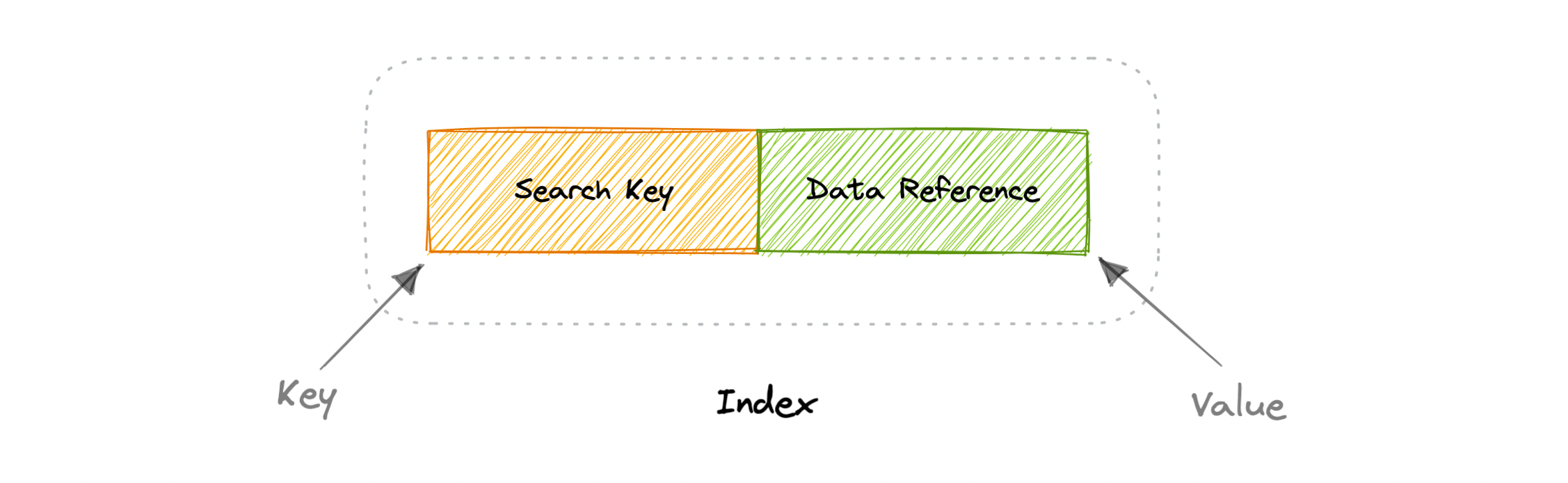
An index is a data structure that can be perceived as a table of contents that points us to the location where actual data lives
-
Two types:
- Dense
- Sparse
Dense Index
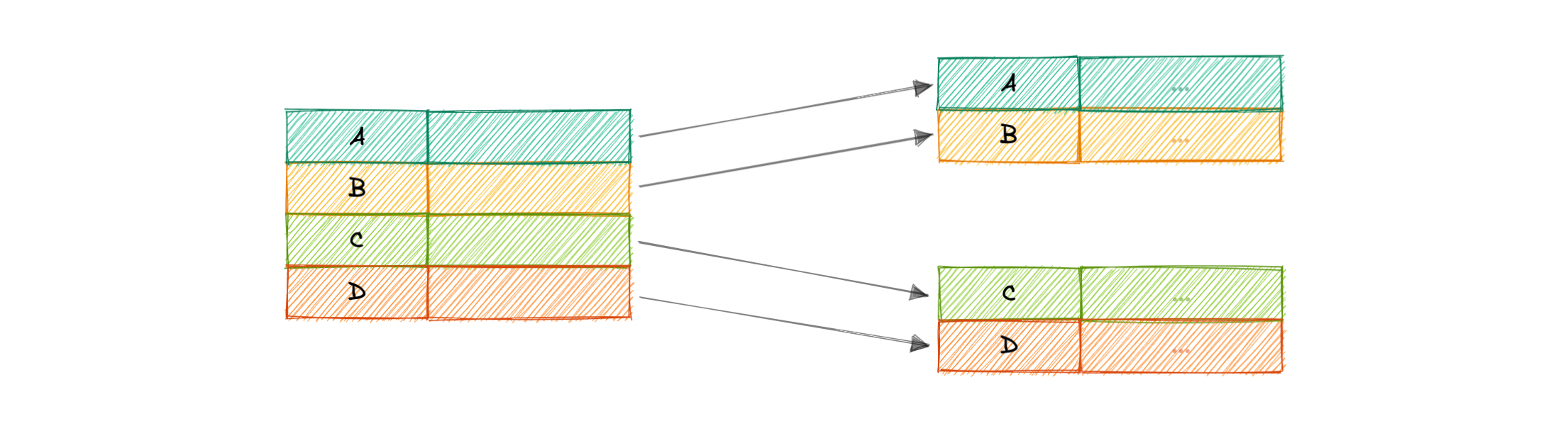
- for every row
- Requires more memory
Sparse Index
- subset of rows
- less memory
Normalization & Denormalization
- Surrogate Key: A system-generated value that uniquely identifies each entry in a table when no other column was able to hold properties of a primary key.
Dependencies
-
Partial dependency: Occurs when the primary key determines some other attributes.
-
Functional dependency: It is a relationship that exists between two attributes, typically between the primary key and non-key attribute within a table.
-
Transitive functional dependency: Occurs when some non-key attribute determines some other attribute.
Anomalies
Database anomaly happens when there is a flaw in the database due to incorrect planning or storing everything in a flat database. This is generally addressed by the process of normalization.
There are three types of database anomalies:
-
Insertion anomaly: Occurs when we are not able to insert certain attributes in the database without the presence of other attributes.
-
Update anomaly: Occurs in case of data redundancy and partial update. In other words, a correct update of the database needs other actions such as addition, deletion, or both.
-
Deletion anomaly: Occurs where deletion of some data requires deletion of other data.
Normalization
- the process of organizing data in a database
- creating tables and establishing relationships between those tables according to rules designed both to protect the data and to make the database more flexible by eliminating redundancy and inconsistent dependency.
Why?
A fully normalized database allows its structure to be extended to accommodate new types of data without changing the existing structure too much.
Normal Forms - guidelines to ensure that db is normalized
1NF
- repeating groups are not permitted
- mixing data types in the same column in not permitted
2NF - satisfies 1NF - no partial dependency
3NF - satisfies 2NF - no transitive dependency
BCNF - stronger version of 3NF - for every FD X -> Y, X should be a super key
Advantages
- reduces data redundancy
- better data design
- increases data consistency
Disadvantages
- Data design is complex
- Slower performance
- Maintenance overhead
- requires more joins
Denormalization
- DB optimization technique when we add redundant data to one or more tables
- helps in avoiding costly joins in a relational db
- improves read performance at the cost of some write performance
Advantages
- reduces data redundancy
- better data design
- Convenient to manage.
Disadvantages
- Expensive inserts and updates.
- Increases complexity of database design.
- Increases data redundancy
CAP Theorem
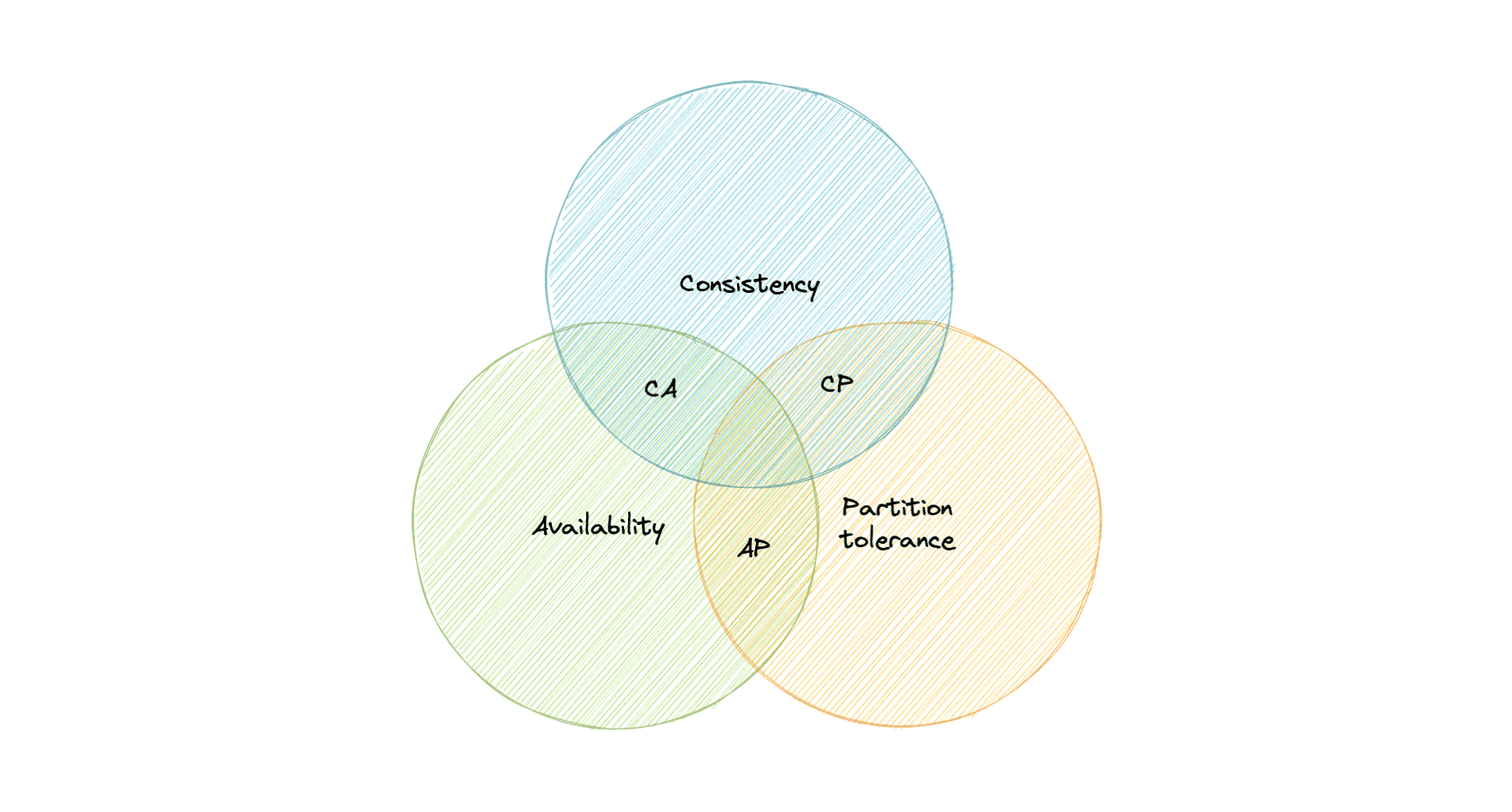
CAP theorem states that a distributed system can deliver only two of the three desired characteristics Consistency, Availability, and Partition tolerance (CAP).
Consistency
- Consistency means that all clients see the same data at the same time, no matter which node they connect to. For this to happen, whenever data is written to one node, it must be instantly forwarded or replicated across all the nodes in the system before the write is deemed "successful".
Availability
- Availability means that any client making a request for data gets a response, even if one or more nodes are down.
Partition Tolerance
- means the system continues to work despite message loss or partial failure.
- A system that is partition-tolerant can sustain any amount of network failure that doesn't result in a failure of the entire network. Data is sufficiently replicated across combinations of nodes and networks to keep the system up through intermittent outages.
CA Tradeoff
- In this word, we can't gurantee the stability of network, so distributed must chose PT.
- This means we tradeoff b/w C and A.
CA Db
-
A CA database delivers consistency and availability across all nodes. It can't do this if there is a partition between any two nodes in the system, and therefore can't deliver fault tolerance.
-
eg. PostgreSQL
CP Db
-
A CP database delivers consistency and partition tolerance at the expense of availability. When a partition occurs between any two nodes, the system has to shut down the non-consistent node until the partition is resolved.
-
eg. MongoDB
AP Db
-
An AP database delivers availability and partition tolerance at the expense of consistency. When a partition occurs, all nodes remain available but those at the wrong end of a partition might return an older version of data than others. When the partition is resolved, the AP databases typically re-syncs the nodes to repair all inconsistencies in the system.
-
eg. Apache Cassandra
PACELC Theorem
- extension of CAP theorem
- introduces latency (L) as an additional attribute of a distributed system.
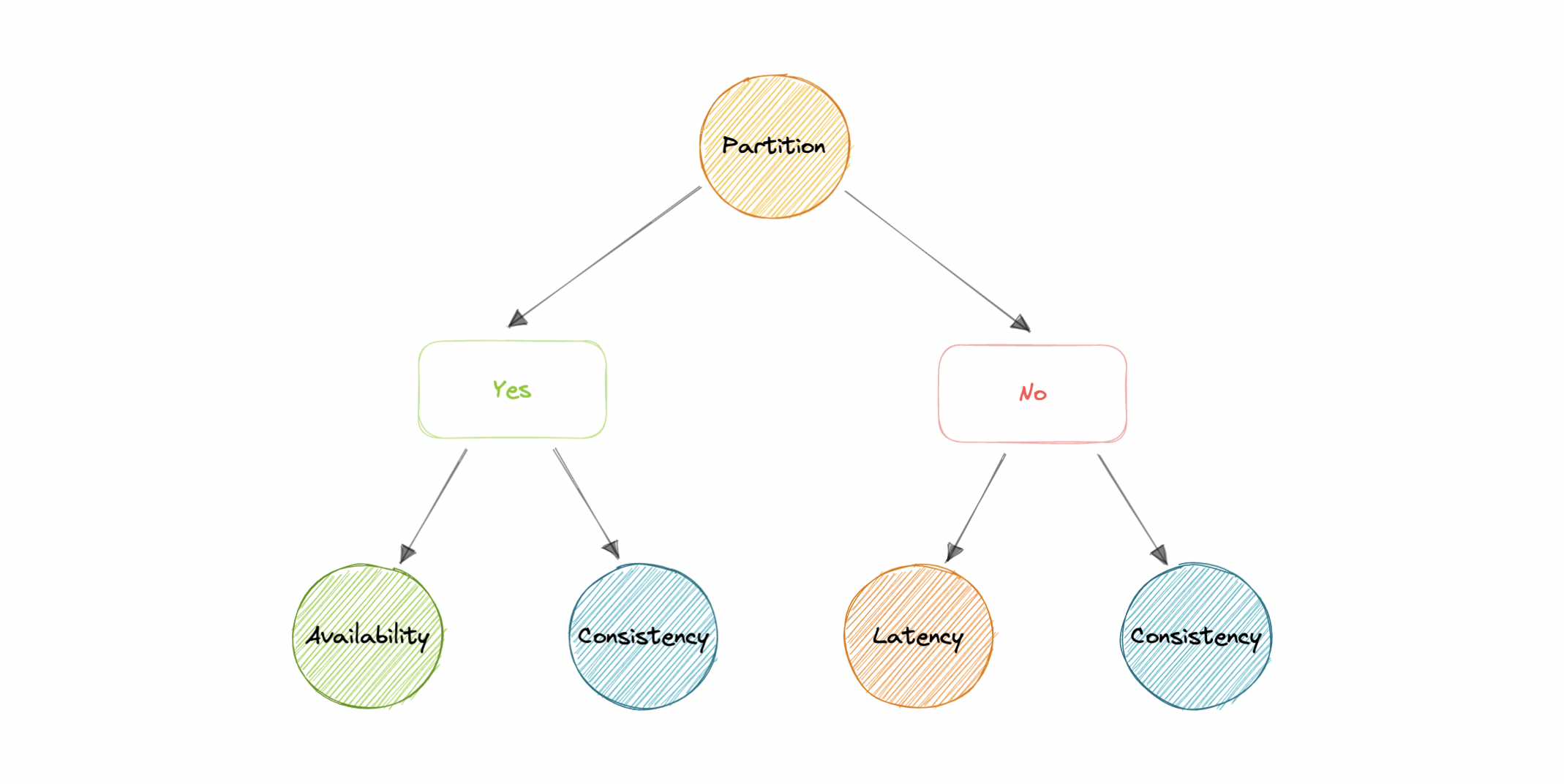
- PACELC theorem states that in the case of Network Partition ‘P’, a distributed system can have tradeoffs between Availability ‘A’ and Consistency ‘C’ Else ‘E’ if there is no Network Partition then a distributed system can have tradeoffs between Latency ‘L’ and Consistency ‘C’.

-
Partition basically means two 2 nodes are not able to communicate with each other.
-
One of the major pitfalls of the CAP Theorem was it did not make any provision for Performance or Latency, in other words, CAP Theorem didn’t provide tradeoffs when the system is under normal functioning or non-partitioned.
-
For example, according to the CAP theorem, a database can be considered available if a query returns a response after 30 days. Obviously, such latency would be unacceptable for any real-world application.
Transactions
- A transaction is a series of database operations that are considered to be a "single unit of work". The operations in a transaction either all succeed, or they all fail.
Tip
Usually, relational databases support ACID transactions, and non-relational databases don't (there are exceptions).
States
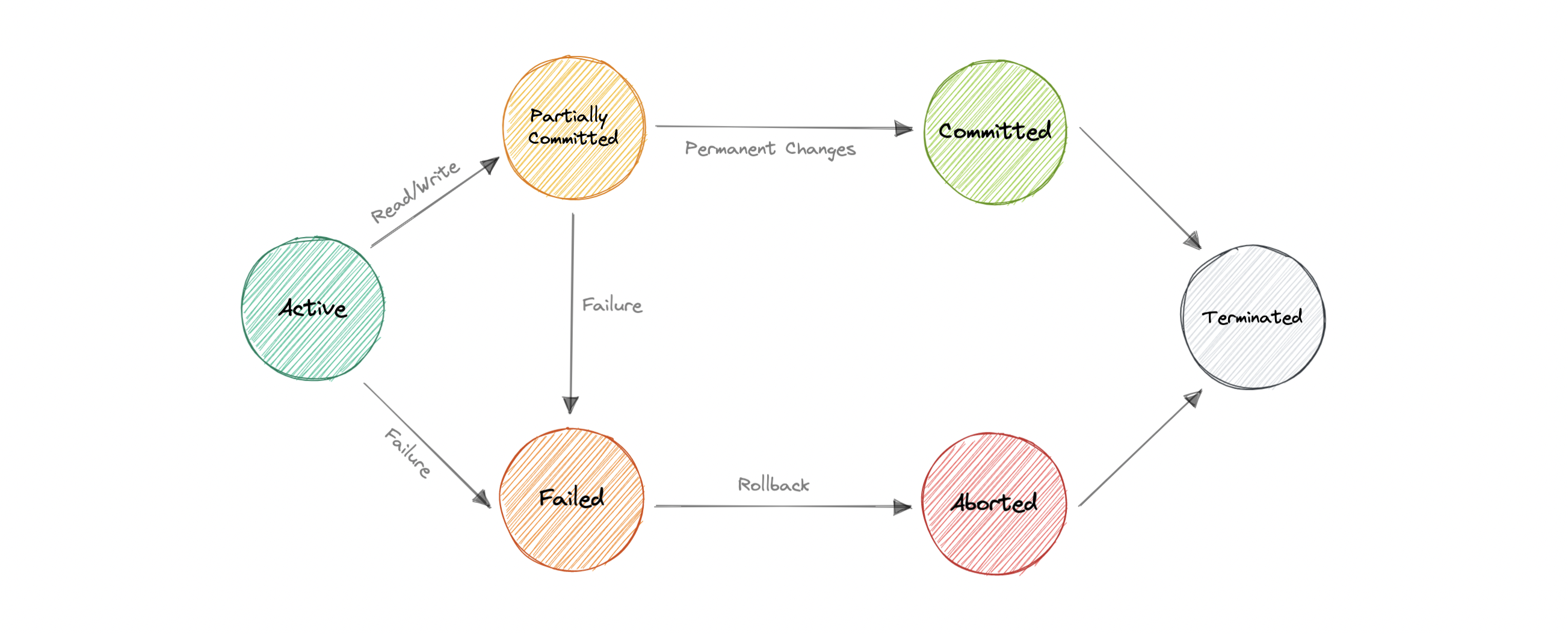
A transaction in a db can be in one of the following states:
Distributed Transaction
A distributed transaction is a set of operations on data that is performed across two or more databases. It is typically coordinated across separate nodes connected by a network, but may also span multiple databases on a single server.
Why?
- a distributed transaction involves altering data on multiple databases.
- all the nodes must commit, or all must abort and the entire transaction rolls back. This is why we need distributed transactions.
Two-Phase Commit
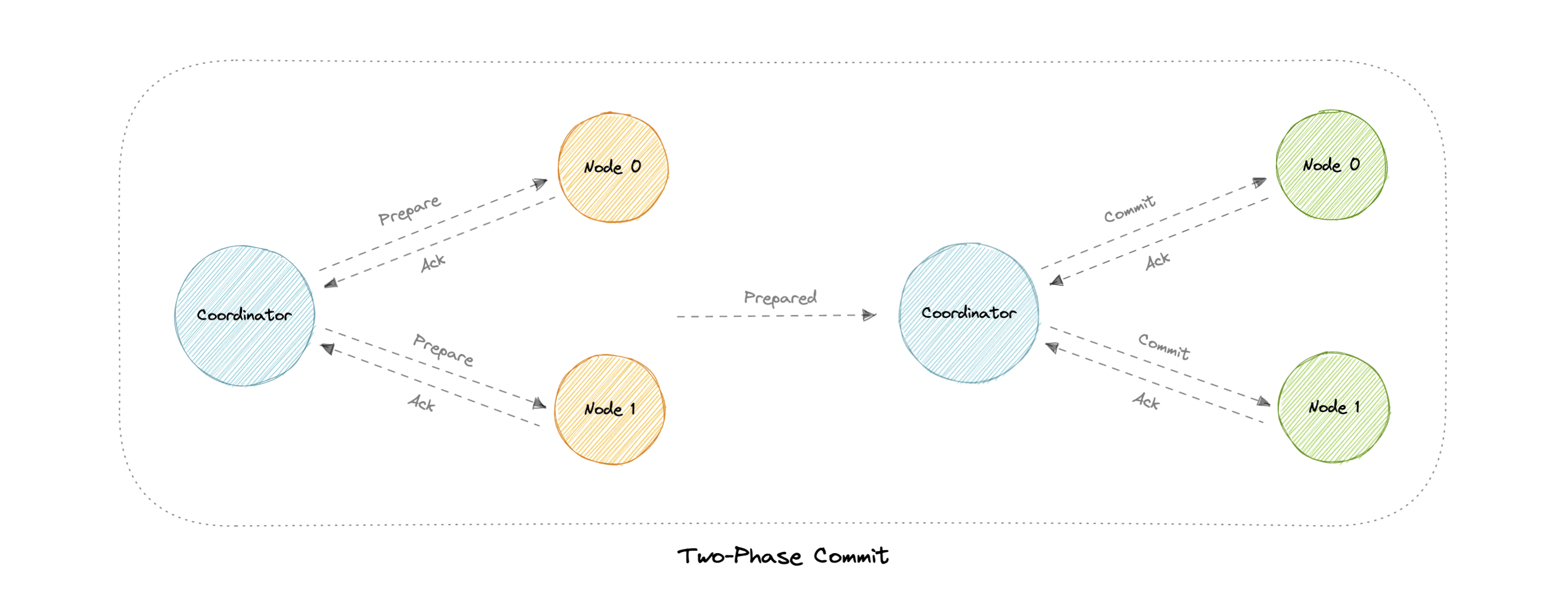
Problems
- What if one of the nodes crashes?
- What if the coordinator itself crashes?
- It is a blocking protocol.
Three-Phase Commit
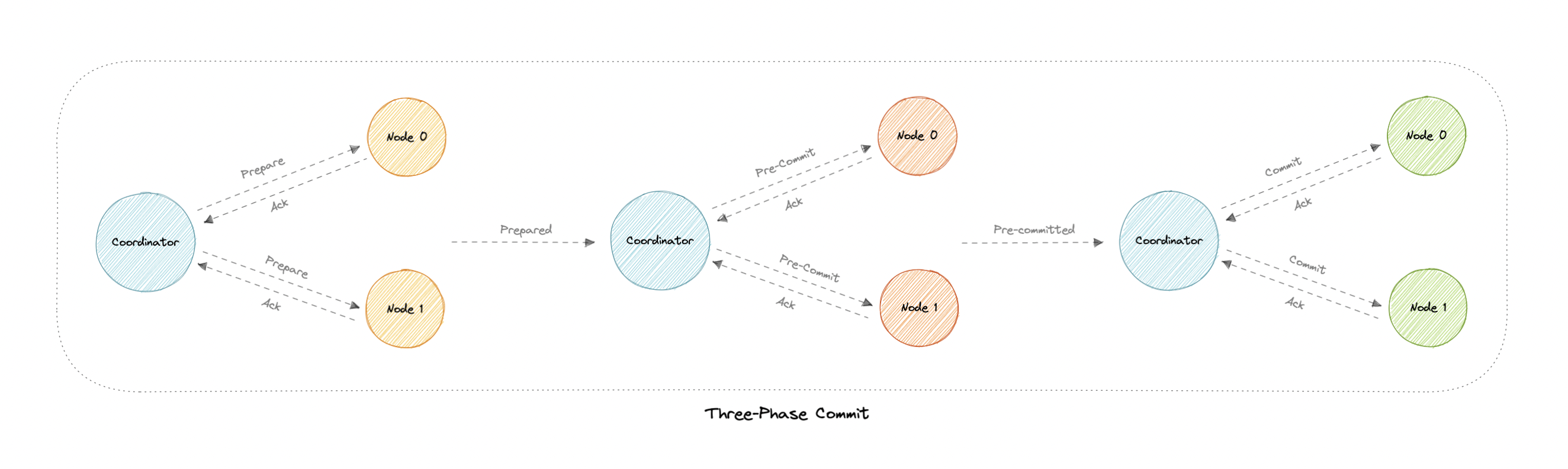
- helps with the blocking problem in 2PC
Why pre-commit?
- If the participant nodes are found in this phase, that means that every participant has completed the first phase. The completion of prepare phase is guaranteed.
Sagas
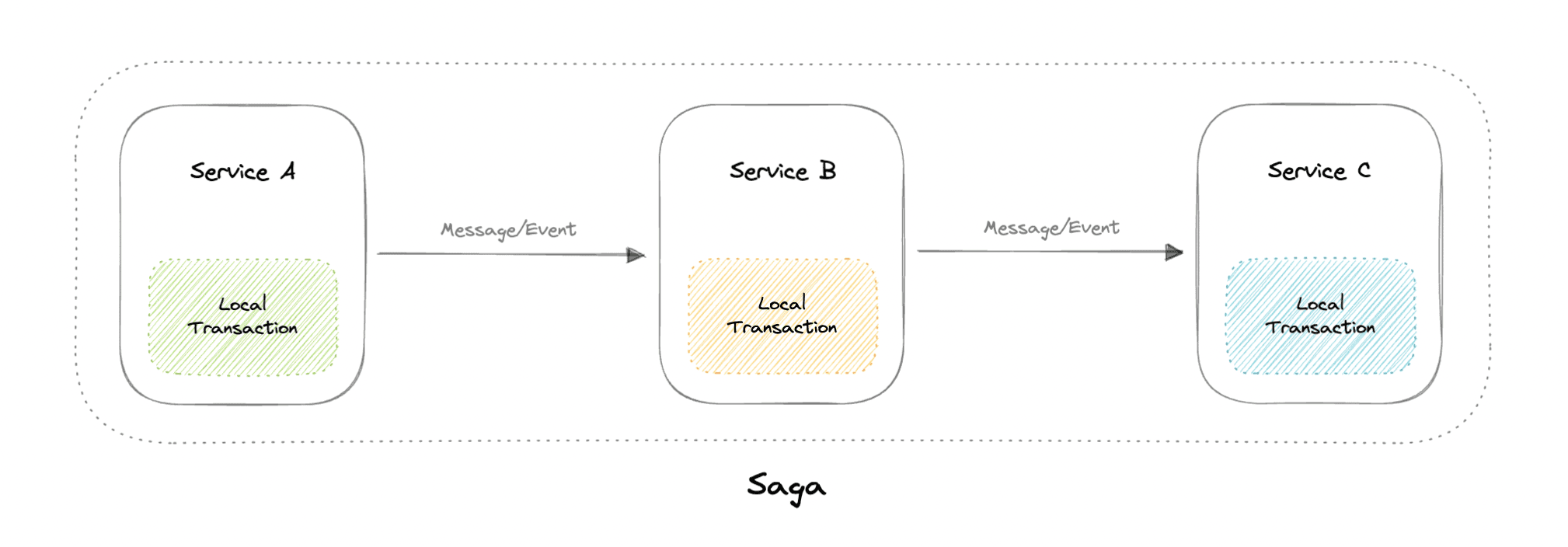
A saga is a sequence of local transactions. Each local transaction updates the database and publishes a message or event to trigger the next local transaction in the saga. If a local transaction fails because it violates a business rule then the saga executes a series of compensating transactions that undo the changes that were made by the preceding local transactions.
- Cons: Hard to debug
Sharding
Data Partioning
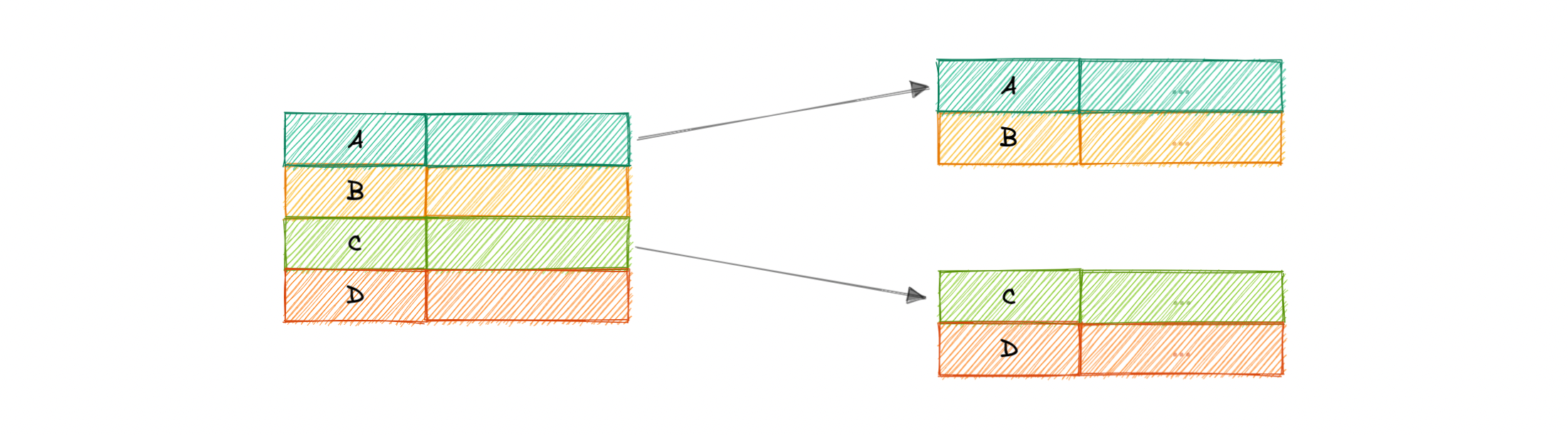
Data partitioning is a technique to break up a database into many smaller parts. It is the process of splitting up a database or a table across multiple machines to improve the manageability, performance, and availability of a database.
-
2 methods:
-
Horizontal Partitioning (Sharding)
- we split the table data horizontally based on the range of values defined by the partition key
-
Vertical Partitioning
- we partition the data vertically based on columns. We divide tables into relatively smaller tables with few elements, and each part is present in a separate partition.
-
Sharding
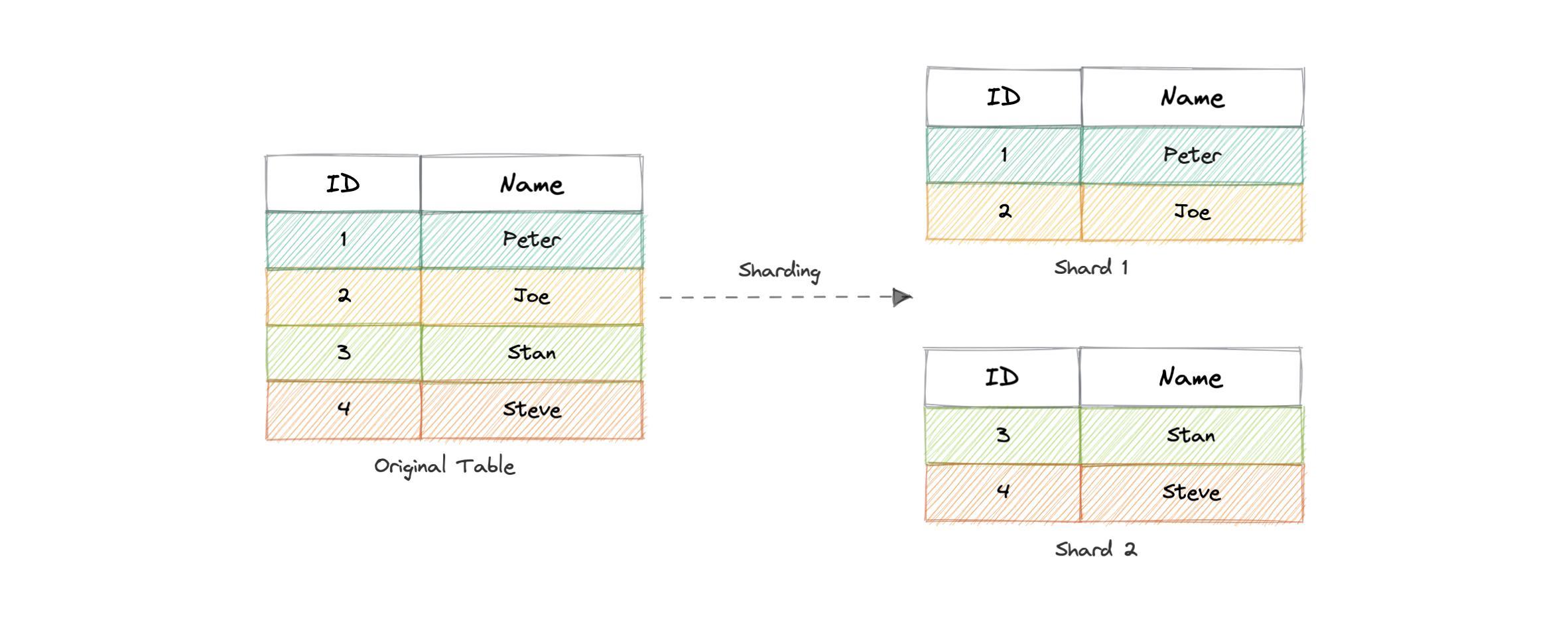
- the data held in each is unique and independent of the data held in other partitions.
- The justification for data sharding is that, after a certain point, it is cheaper and more feasible to scale horizontally by adding more machines than to scale it vertically by adding powerful servers
Partioning Criterias
- Hash-based
- List-based
- Range-based
When to use?
- Quickly scale by adding more shards
- Better performance as each machine is under less load
- When more concurrent connections are required
- Maintain data in distinct geo locations
Adv
- Availability
- Scalability
- data is distributed across multiple partitions
- Query Performance
Disadv
- Complexity
- Joins across shards cost much
- Rebalancing
- If the data distribution is not uniform or there is a lot of load on a single shard, in such cases, we have to rebalance our shards so that the requests are as equally distributed among the shards as possible.
Database Federation
-
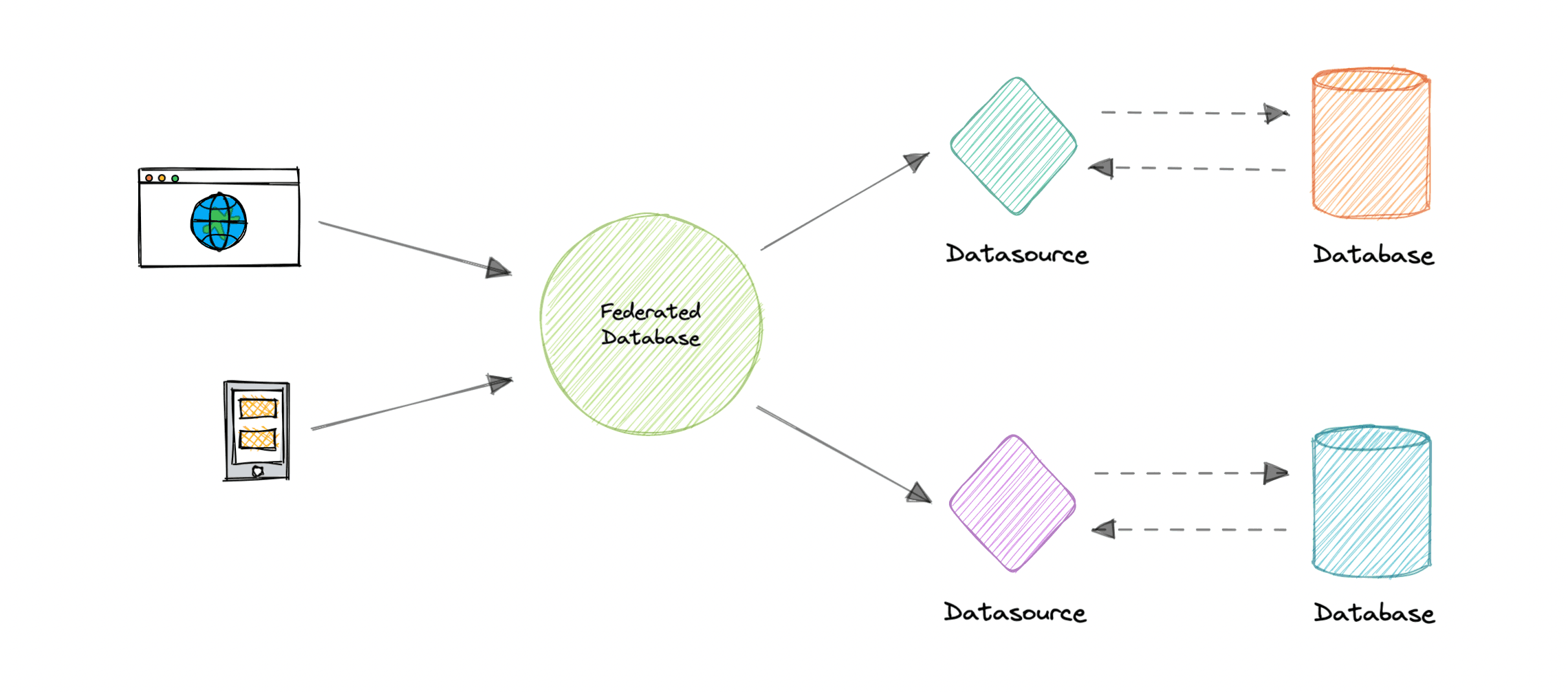
Federation (or functional partitioning) splits up databases by function. The federation architecture makes several distinct physical databases appear as one logical database to end-users.
-
All the components are tied together by one or more federal schemas. They specify the information that can be shared by the federation components and to provide a common basis for communication among them.
-
Federation also provides a cohesive, unified view of data derived from multiple sources. The data sources for federated systems can include databases and various other forms of structured and unstructured data.
-
Flexible data sharing
- access heterogeneous data in a unified way
- joins can be costly
Chapter 2
N-tier Architecture
- N-tier architecture divides an application into logical layers and physical tiers.
- Layers are a way to separate responsibilities and manage dependencies.
- Each layer has a specific responsibility. A higher layer can use services in a lower layer, but not the other way around.
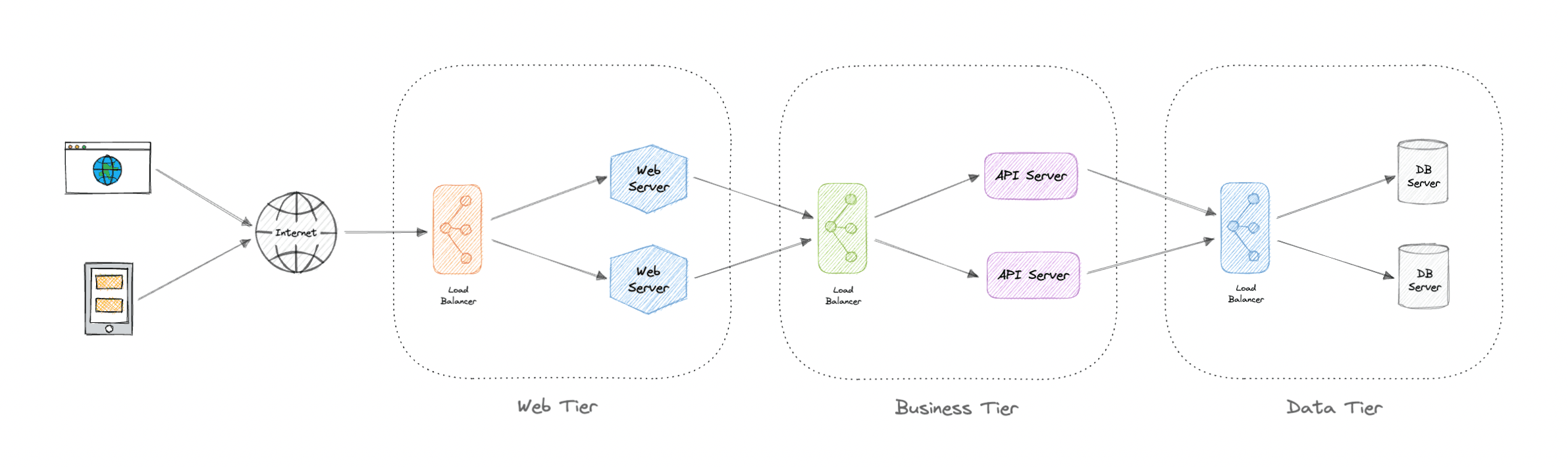
Tiers are physically separated, running on separate machines. A tier can call to another tier directly, or use asynchronous messaging. Although each layer might be hosted in its own tier, that's not required. Several layers might be hosted on the same tier. Physically separating the tiers improves scalability and resiliency and adds latency from the additional network communication.
An N-tier architecture can be of two types:
- In a closed layer architecture, a layer can only call the next layer immediately down.
- In an open layer architecture, a layer can call any of the layers below it
Types
Single/1-Tier architecture
- It is the simplest one as it is equivalent to running the application on a personal computer. All of the required components for an application to run are on a single application or server.
2-Tier architecture
- In this architecture, the presentation layer runs on the client and communicates with a data store. There is no business logic layer or immediate layer between client and server.
3-Tier architecture
-
3-Tier is widely used and consists of the following different layers:
-
Presentation layer: Handles user interactions with the application.
-
Business Logic layer: Accepts the data from the application layer, validates it as per business logic and passes it to the data layer.
-
Data Access layer: Receives the data from the business layer and performs the necessary operation on the database.
-
Advantages
- Improves availability
- better security as layers can behave as firewalls
- better scalability
Disadvantages
- Increased complexity
- increased network latency as no of tiers increases
- expensive
Message Brokers
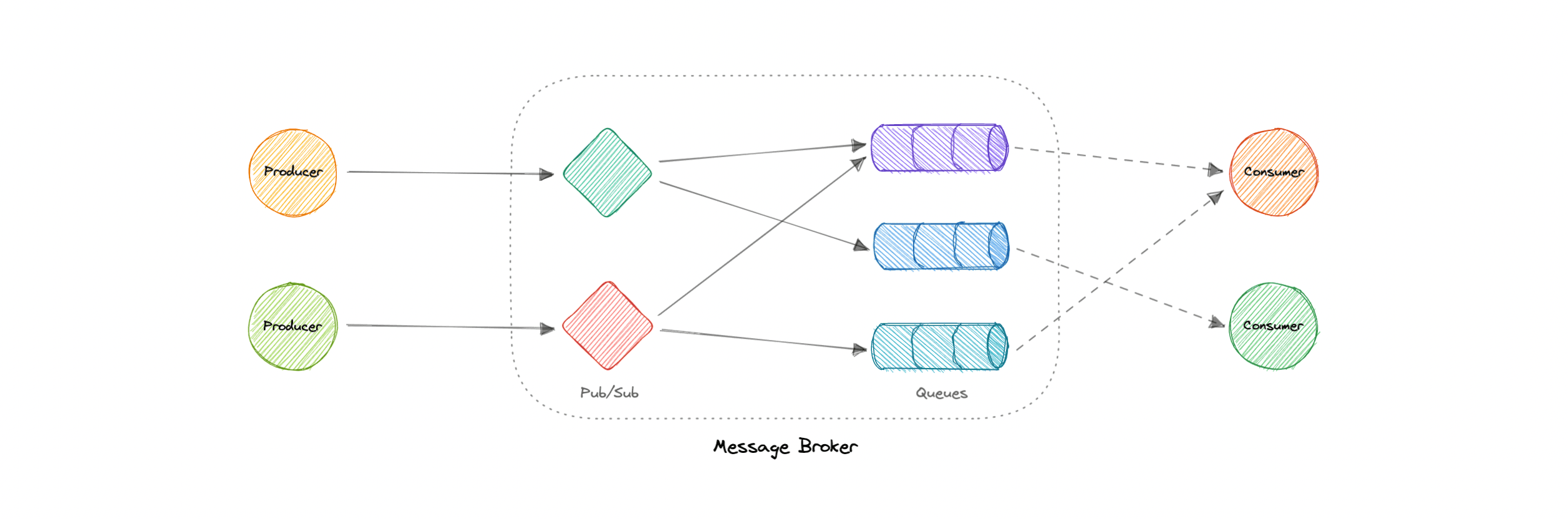
A message broker is a software that enables applications, systems, and services to communicate with each other and exchange information.
-
interdependent services can "talk" with one another directly, even if they were written in different languages or implemented on different platforms.
-
Message brokers can validate, store, route, and deliver messages to the appropriate destinations. They serve as intermediaries between other applications, allowing senders to issue messages without knowing where the receivers are, whether or not they are active, or how many of them there are.
-
Decoupling
Models
-
Point-to-point messaging
- one-to-one relationships b/w sender and receiver
-
Publish-Subscribe messaging
- topics and subscriptions
Message Brokers vs Event Streaming
-
Message Brokers suppport:
- message queues
- pub/sub
- Eg. RabbitMQ, SNS, SQS
-
Event Streaming supports:
- pub/sub only
- scalable
- but no message delivery guarantee
- fast but not as feature rich as MB
- Eg. Kafka, Kinesis
Message Queues
- service-to-service communication
- async communication
- large scale distributed systems

Features
-
Push or Pull Delivery
- Pull: continuously querying for new messages
- Push: consumer is notified when a message is available
-
FIFO
- Head of the queue is processed first
-
Schedule/Delay Delivery
- At a specific time
-
At-least-Once Delivery
-
Exactly-Once Delivery
-
Dead-Letter Queues
- better inspection for messages that can't be processed successfully
Backpressure
-
If queues start to grow significantly, the queue size can become larger than memory, resulting in cache misses, disk reads, and even slower performance.
-
Backpressure can help by limiting the queue size, thereby maintaining a high throughput rate and good response times for jobs already in the queue.
-
Once the queue fills up, clients get a server busy or HTTP 503 status code to try again later.
-
Clients can retry a request perhaps with exponential backoff strategy.
Pub-Sub
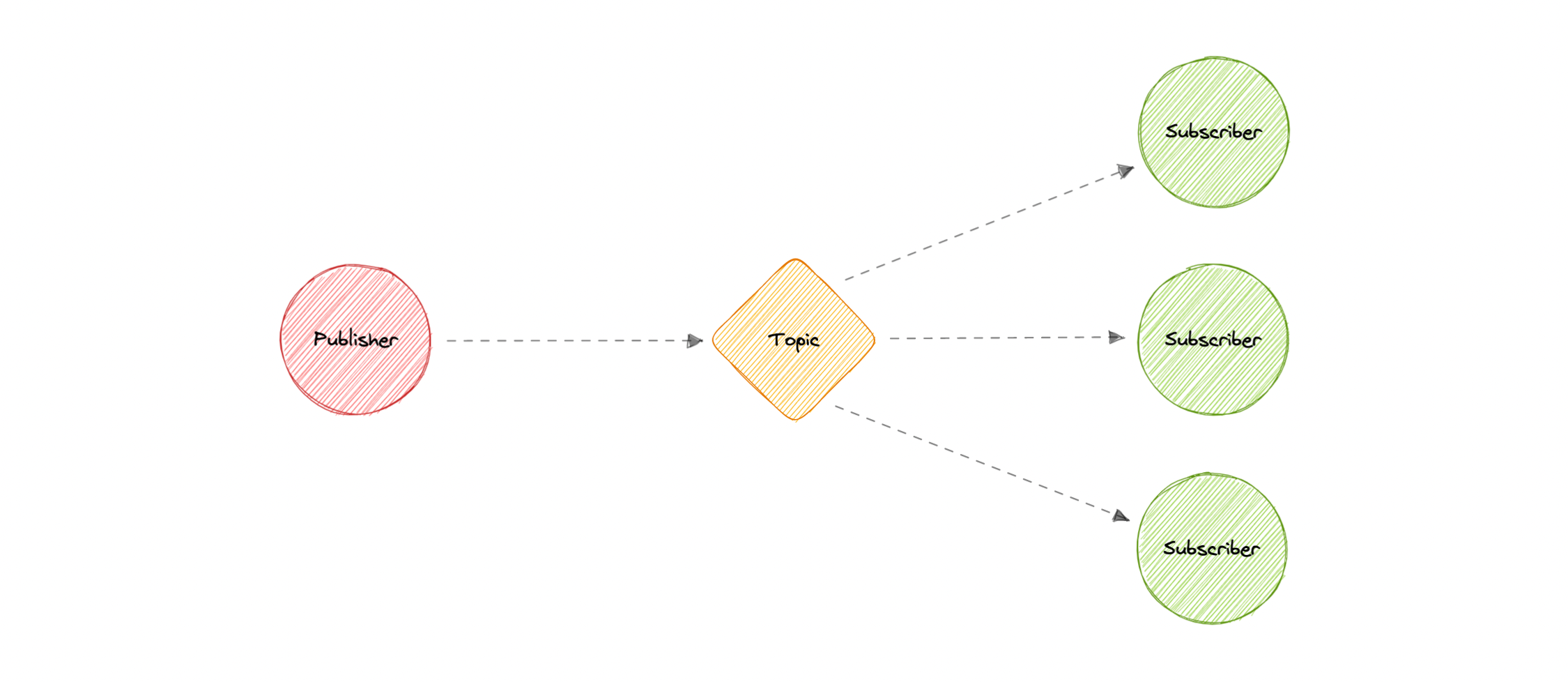
- Eliminates Polling
- Decoupled and independent scaling
- Fanout
- msg is sent to a topic and then replicated and pushed to multiple endpoints
- parallel processing
- Durability
- eg. SNS
Monoliths and Microservices
Monoliths
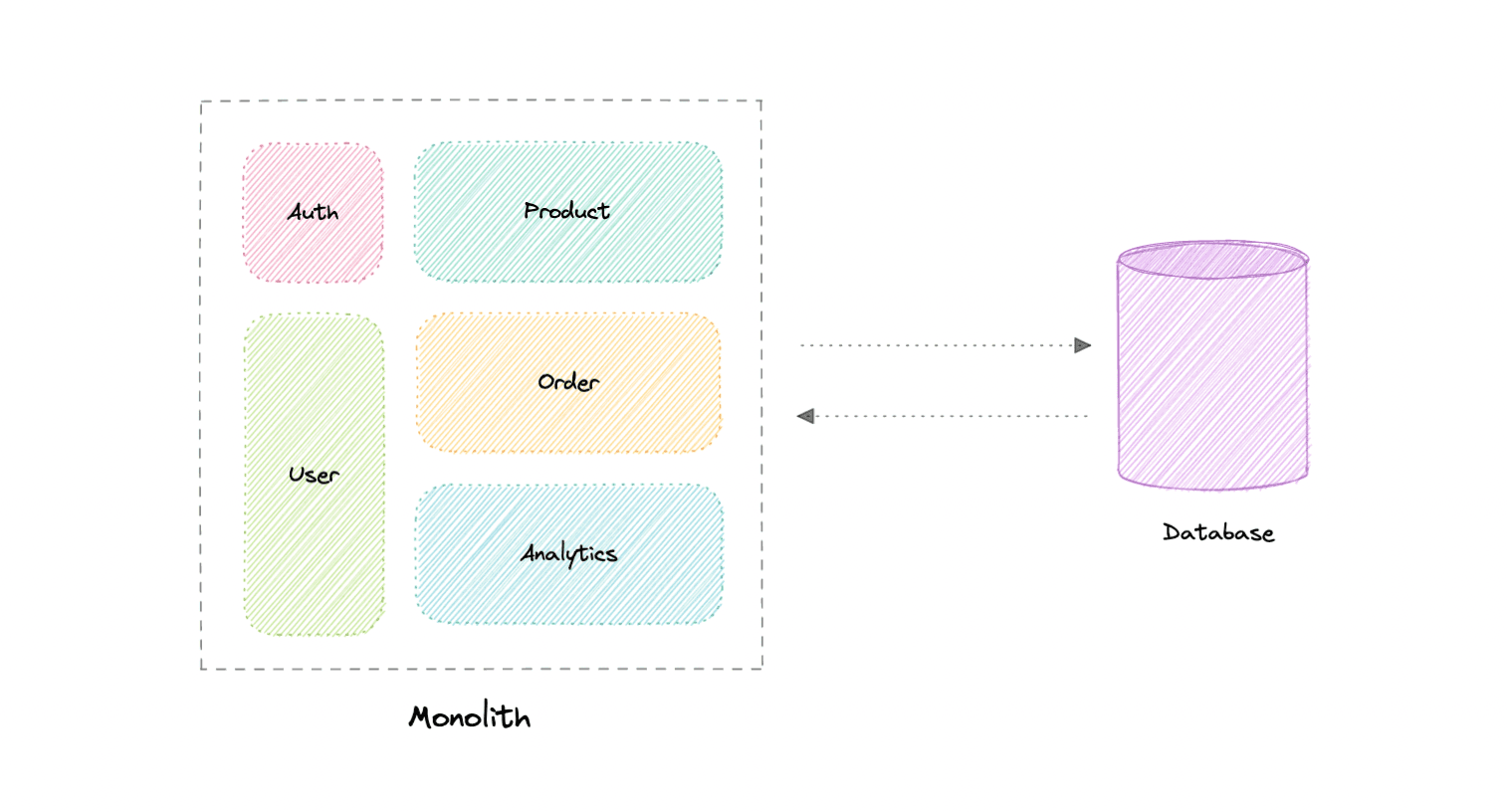
- self-contained & independent application
- built as single unit
- can perform all the tasks to satisfy business needs
-
Adv
- simple to develop or debug
- fast and reliable communication
- easy testing
- supports ACID transactions
-
Disadv
- maintenance becomes hard as system grows
- tightly coupled, hard to extend
- on each update, entire app is redeployed
- single bug, whole system down
- difficult to scale
Modular Monoliths
-
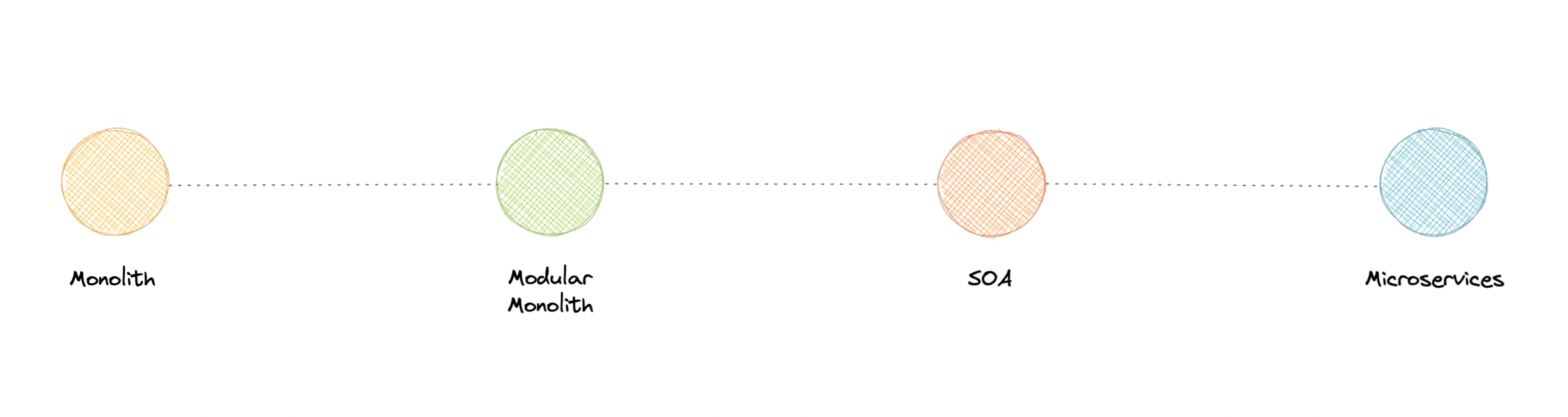
A Modular Monolith is an approach where we build and deploy a single application (that's the Monolith part), but we build it in a way that breaks up the code into independent modules for each of the features needed in our application.
-
reduces dependencies
Microservices
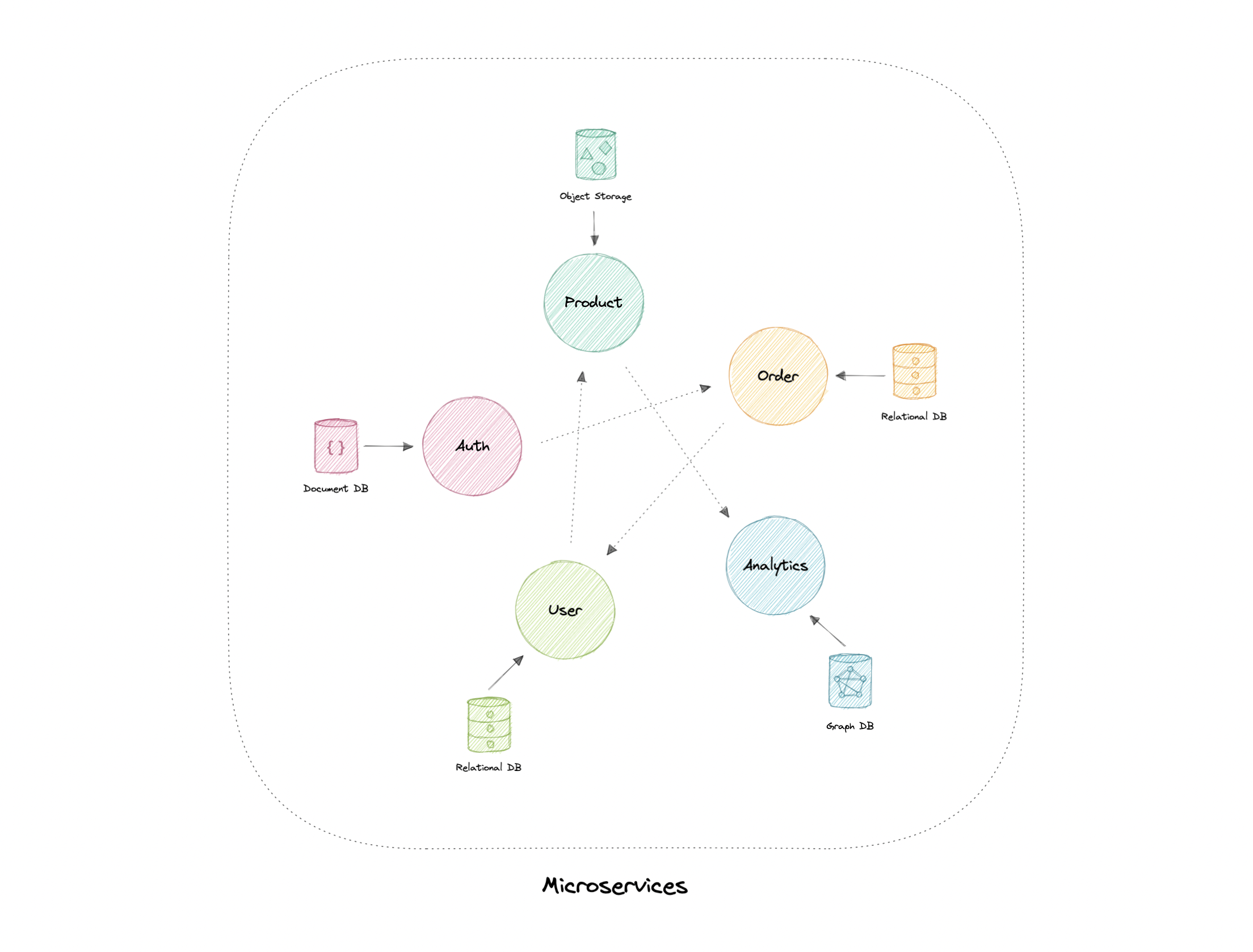
- A microservices architecture consists of a collection of small, autonomous services where each service is self-contained and should implement a single business capability.
-
Each service has a separate codebase, which can be managed by a small development team. Services can be deployed independently and a team can update an existing service without rebuilding and redeploying the entire application.
-
loosely coupled
- small but focused
- resilience and FT
- highly maintainable
Disadvantages
- Complexity of a distributed system
- Testing is more difficult
- expensive to maintain
- network congestion and latency
Best practices
- services should be loosely coupled with high functional cohesion
- services should communicate through well-designed APIs
- data storage should be private to the service that owns the data
- ensure API changes are backward compatible
Service-Oriented Architecture (SOA)
-
Service-oriented architecture (SOA) defines a way to make software components reusable via service interfaces.
-
These interfaces utilize common communication standards and focus on maximizing application service reusability whereas microservices are built as a collection of various smallest independent service units focused on team autonomy and decoupling.
So, which one and when?
- Each has its own advant and disadvant.
- Advised to start with monolith when building a new system or ask ourselves some questions:
- Is team too large to work effectively on a shared codebase?
- Are teams blocked on other teams?
- Is business mature enough to use microservices?
Tip
We frequently draw inspiration from companies such as Netflix and their use of microservices, but we overlook the fact that we are not Netflix. They went through a lot of iterations and models before they had a market-ready solution, and this architecture became acceptable for them when they identified and solved the problem they were trying to tackle.
- Microservices are solutions to complex concerns and if your business doesn't have complex issues, you don't need them.
EDA (Event-Driven Architecture)
-
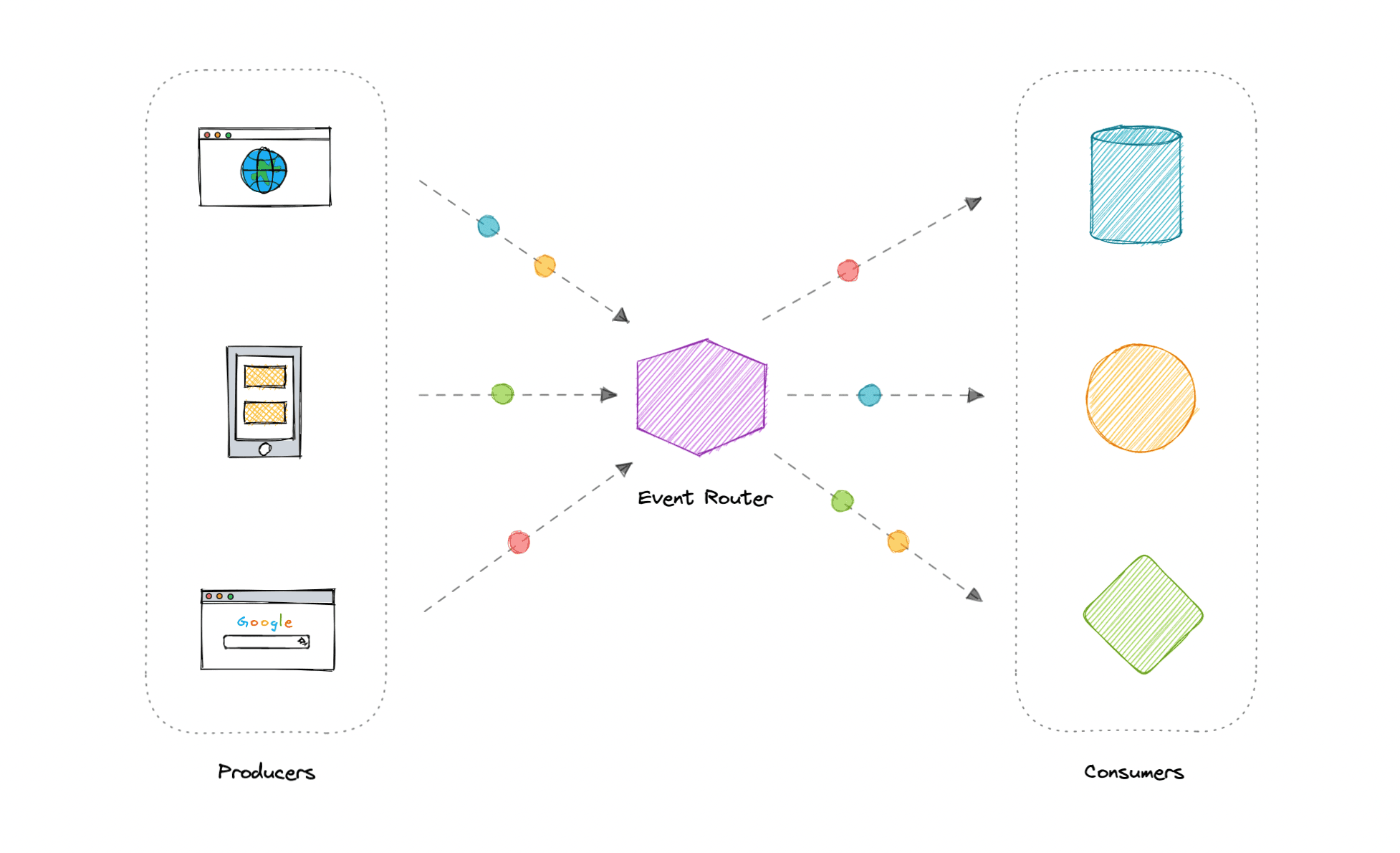
Event-Driven Architecture (EDA) is about using events as a way to communicate within a system.
-
The publisher is unaware of who is consuming an event and the consumers are unaware of each other. Event-Driven Architecture is simply a way of achieving loose coupling between services within a system.
What is an event?
An event is a data point that represents state changes in a system. It doesn't specify what should happen and how the change should modify the system, it only notifies the system of a particular state change. When a user makes an action, they trigger an event.
- Common use cases:
- Sagas
- Pub-Sub
- Fanout and parallel processing
- metadata and metrics
Event Sourcing
Instead of storing just the current state of the data in a domain, use an append-only store to record the full series of actions taken on that data. The store acts as the system of record.
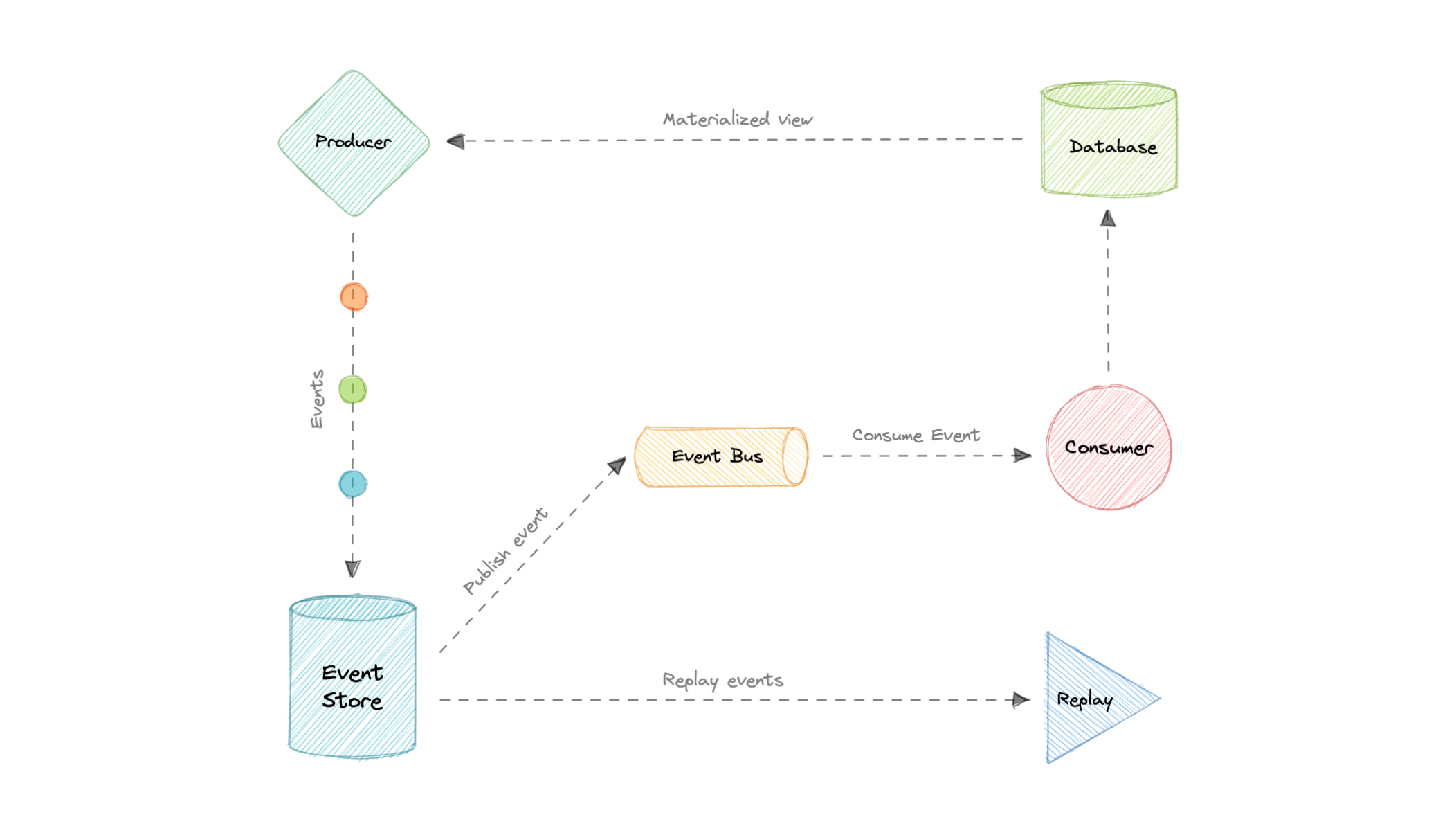
--Event sourcing is about using events as a state, which is a different approach to storing data. Rather than storing the current state, we're instead going to be storing events.
Advantages
- Excellent for real-time data reporting
- Great for fail safety as data can be reconstituted from the event source
- Preferred way of achieving audit logs functionality for high compliance system
Disadvantages
- Requires an extremely efficient network infrastructure
- Requires reliable way to control message formats, such as schema registry
Command and Query Responsibility Segregation (CQRS)
-
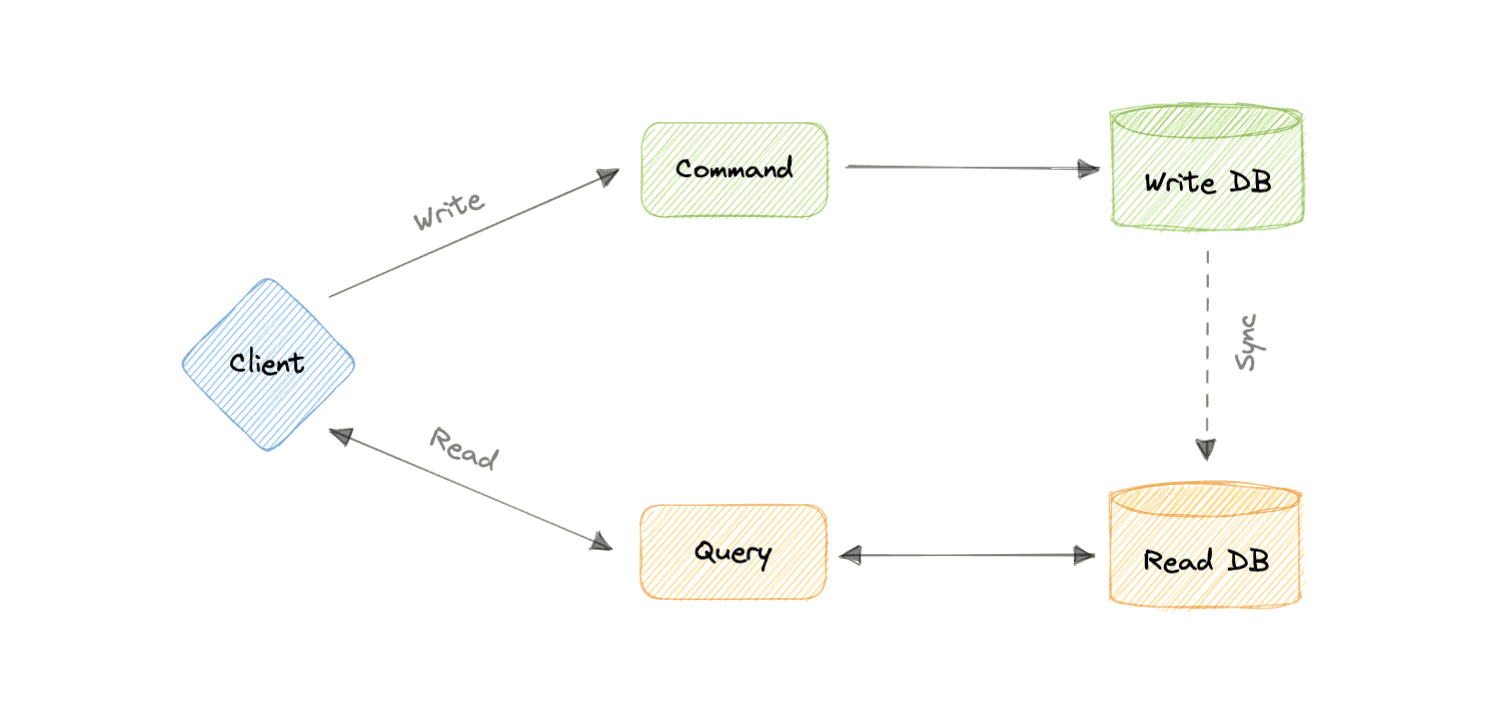
an architectural pattern that divides a system's actions into commands and queries.
-
In CQRS, a command is an instruction, a directive to perform a specific task. It is an intention to change something and doesn't return a value, only an indication of success or failure. And, a query is a request for information that doesn't change the system's state or cause any side effects.
Tip
The core principle of CQRS is the separation of commands and queries. They perform fundamentally different roles within a system, and separating them means that each can be optimized as needed, which distributed systems can really benefit from.
- decoupling
- independent scaling of read and write workloads
- But:
- more complex app design
- increased system maintenance efforts
API Gateway
- The API Gateway is an API management tool that sits between a client and a collection of backend services. It is a single entry point into a system that encapsulates the internal system architecture and provides an API that is tailored to each client.
- It also has other responsibilities such as authentication, monitoring, load balancing, caching, throttling, logging, etc.
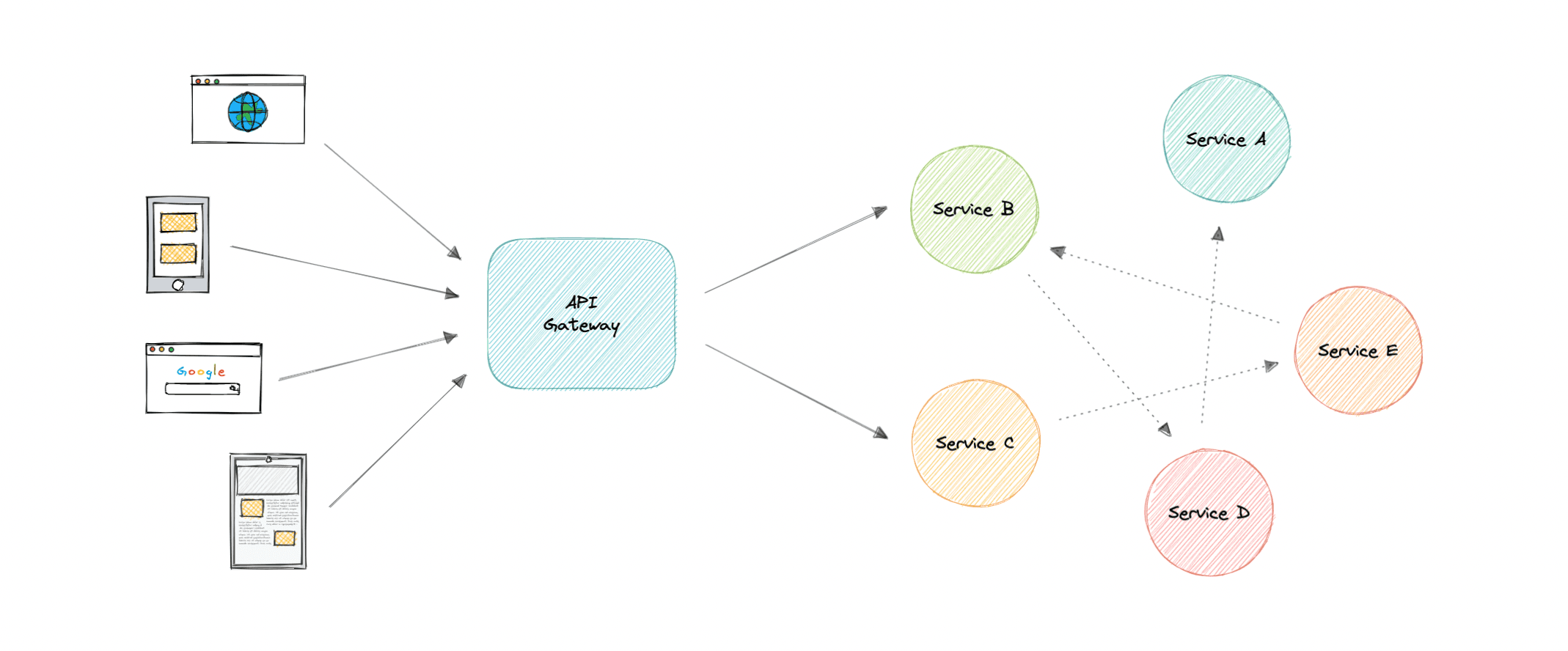
We need it because microservices provide fine-grained APIs ie the clients need to interact with multiple services. So, API GW can provide a single entry point for all clients with some additional features and better management.
Features
- Authentication and Authorization
- Service Discovery
- Caching
- Security
- Reverse Proxy
- Logging, Tracing
- IP whitelisting or blacklisting
Advantages
- Encapsulates the internal structure of an API.
- Provides a centralized view of the API.
- Simplifies the client code.
- Monitoring, analytics, tracing, and other such features.
Disadvantages
- Possible single point of failure.
- Might impact performance.
- Can become a bottleneck if not scaled properly.
- Configuration can be challenging.
Backend for Frontend (BFF) Pattern
- In the Backend For Frontend (BFF) pattern, we create separate backend services to be consumed by specific frontend applications or interfaces. This pattern is useful when we want to avoid customizing a single backend for multiple interfaces.
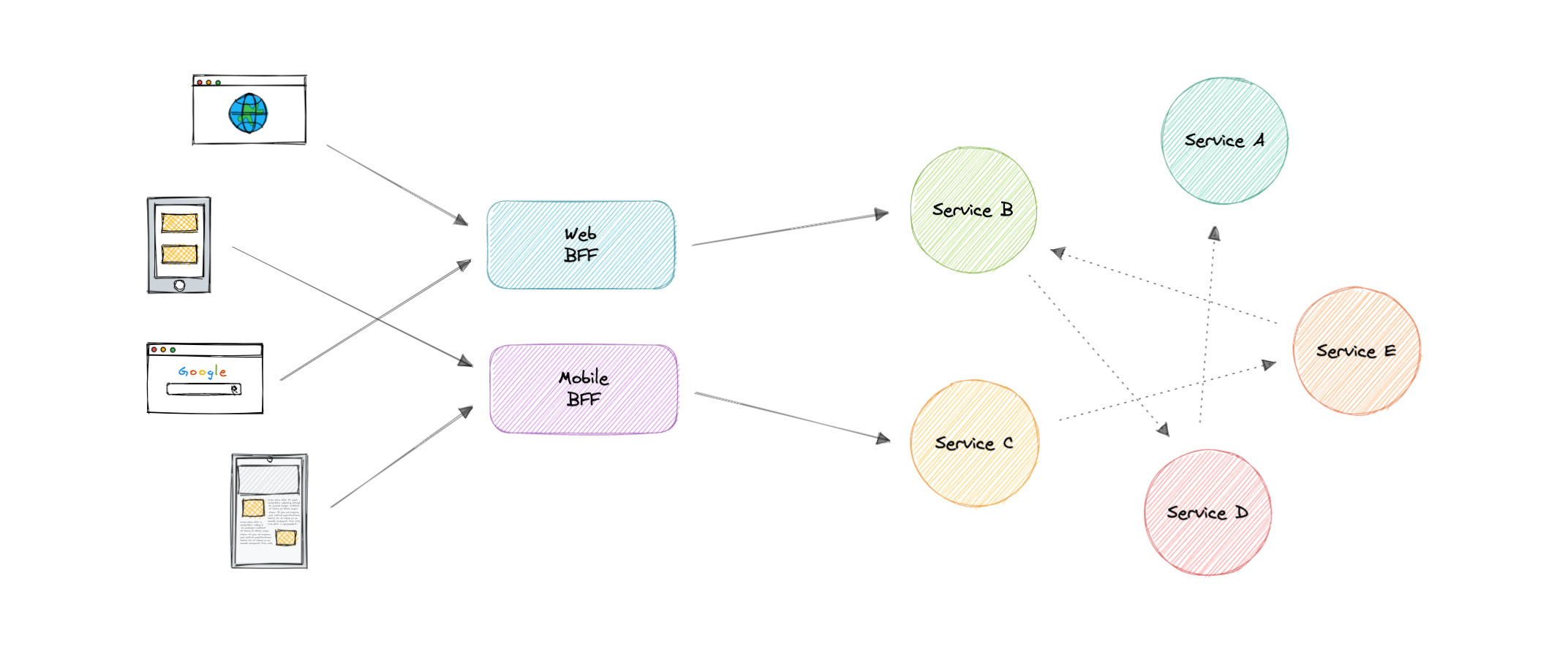
- Also, sometimes the output of data returned by the microservices to the front end is not in the exact format or filtered as needed by the front end. To solve this issue, the frontend should have some logic to reformat the data, and therefore, we can use BFF to shift some of this logic to the intermediate layer.
Tip
The primary function of the backend for the frontend pattern is to get the required data from the appropriate service, format the data, and sent it to the frontend.
Eg. GraphQL
When to use BFF?
- optimize backend for the requirements of a specific client
- Customizations are made to a general-purpose backend to accommodate multiple interfaces (like imdb.com and m.imdb.com)
REST, GraphQL, gRPC
API
API stands for Application Programming Interface. It is a set of definitions and protocols for building and integrating application software.
- if we want to interact with a computer or system to retrieve information or perform a function, an API helps you communicate what you want to that system so it can understand and complete the request.
REST
- Representational State Transfer
- fundamental unit: resource
Constraints
- Uniform Interface
- Client-Server
- Stateless (no client context shall be stored on the server between requests)
- Cacheable (every response should include whether the response is cacheable or not)
HTTP Verbs
HTTP defines a set of request methods to indicate the desired action to be performed for a given resource.
- GET
- POST
- PUT
- DELETE
- PATCH
HTTP Response Codes
5 classes:
- 1xx: Informational responses
- 2xx: Successful responses
- 3xx: Redirection responses
- 4xx: Client error responses
- 5xx: Server error responses
Advantages
- Simple and easy to understand
- Flexible and portable
- Good caching support
- Client and server are decoupled
Disadvantages
- Over-fetching of data
GraphQL
- query language and server-side runtime for APIs that gives client exactly the data they request and no more
- by Facebook
- designed to make APIs fast, flexible
- add or deprecate fields without impacting existing queries
- Fundamental unit: query
- Single url endpoint
Concepts
-
Schema
- A GraphQL schema describes the functionality clients can utilize once they connect to the GraphQL server.
-
Queries
- A query is a request made by the client. It can consist of fields and arguments for the query.
-
Resolvers
- Resolver is a collection of functions that generate responses for a GraphQL query. In simple terms, a resolver acts as a GraphQL query handler.
Advantages
- Eliminates over-fetching of data
- Strongly defined schema
Disadvantages
- Shifts complexity to server side
- Caching becomes hard
Use-Cases
-
reducing app bandwidth usage as we query multiple resources in a single query
-
when working with graph-like data model
gRPC
- by Google
- high performance Remote Procedure Call framework that can run in any environment
- It can efficiently connect services in and across data centers with pluggable support for load balancing, tracing, health checking, authentication and much more.
Concepts
-
Protocol Buffers
-
provide a language and platform-neutral extensible mechanism for serializing structured data in a forward and backward-compatible way
-
It's like JSON, except it's smaller and faster, and it generates native language bindings.
-
-
Service Definition
- gRPC is based on the idea of defining a service and specifying the methods that can be called remotely with their parameters and return types
Advantages
- Lightweight and efficient
- High Performance
- Bi-directional streaming
Disadvantages
- Limited browser support
- Steeper learning curve
Use-Cases
- Real-time communication via bi-dir streaming
- efficient inter-service communication in microservices
- low latency and high throughput communication
| Type | Coupling | Chattiness | Performance | Complexity | Caching | Codegen | Discoverability | Versioning |
|---|---|---|---|---|---|---|---|---|
| REST | Low | High | Good | Medium | Great | Bad | Good | Easy |
| GraphQL | Medium | Low | Good | High | Custom | Good | Good | Custom |
| gRPC | High | Medium | Great | Low | Custom | Great | Bad | Hard |
Long Polling, Websockets, Server-Sent Events (SSE)
Web applications were initially developed around a client-server model, where the web client is always the initiator of transactions like requesting data from the server. Thus, there was no mechanism for the server to independently send, or push, data to the client without the client first making a request. Let's discuss some approaches to overcome this problem.
Long Polling
-
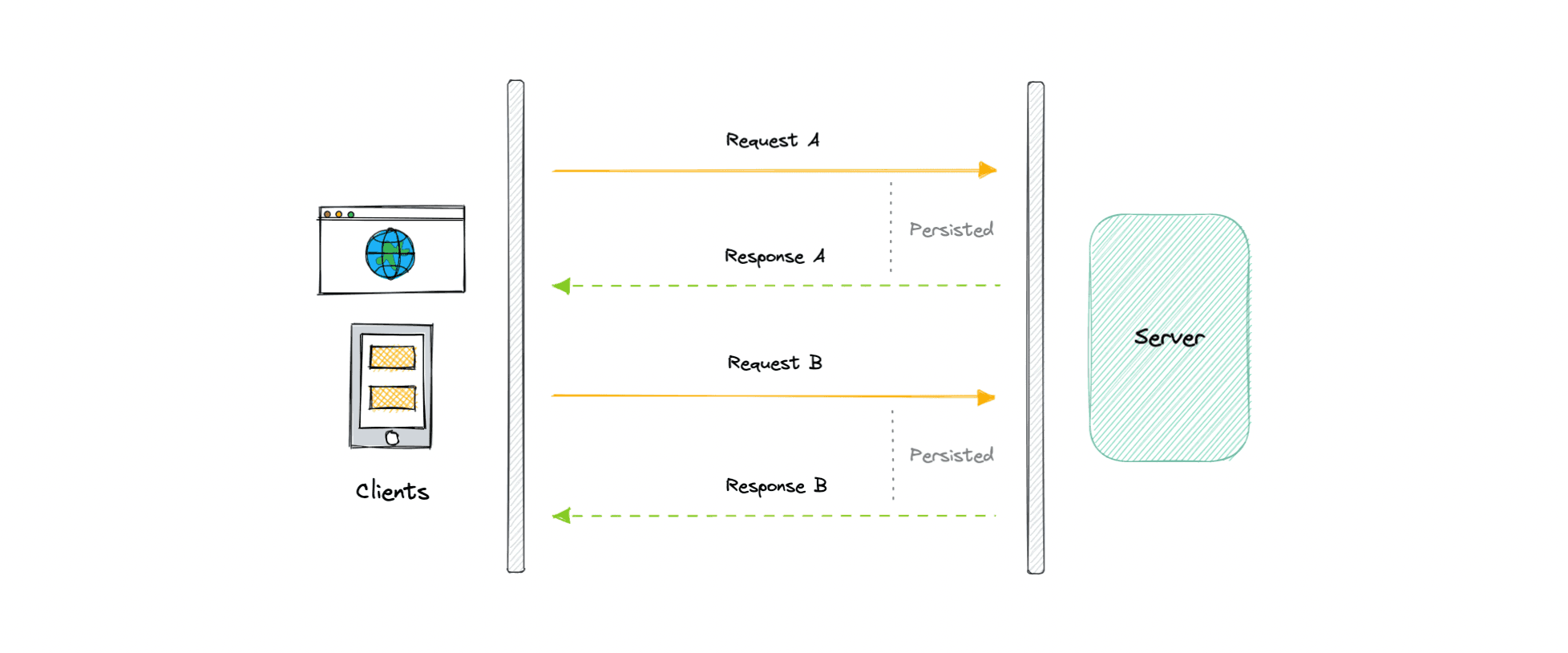
HTTP Long polling is a technique used to push information to a client as soon as possible from the server. As a result, the server does not have to wait for the client to send a request.
-
In Long polling, the server does not close the connection once it receives a request from the client. Instead, the server responds only if any new message is available or a timeout threshold is reached.
Working
Let's understand how long polling works:
- The client makes an initial request and waits for a response.
- The server receives the request and delays sending anything until an update is available.
- Once an update is available, the response is sent to the client.
- The client receives the response and makes a new request immediately or after some defined interval to establish a connection again.
Advantages
- easy to implement, good for small-scale
- nearly universally supported
Disadvantages
- not scalable
- creates a new conn each time, which can be intensive on the server
- reliable message ordering can be an issue for multiple requests
WebSockets
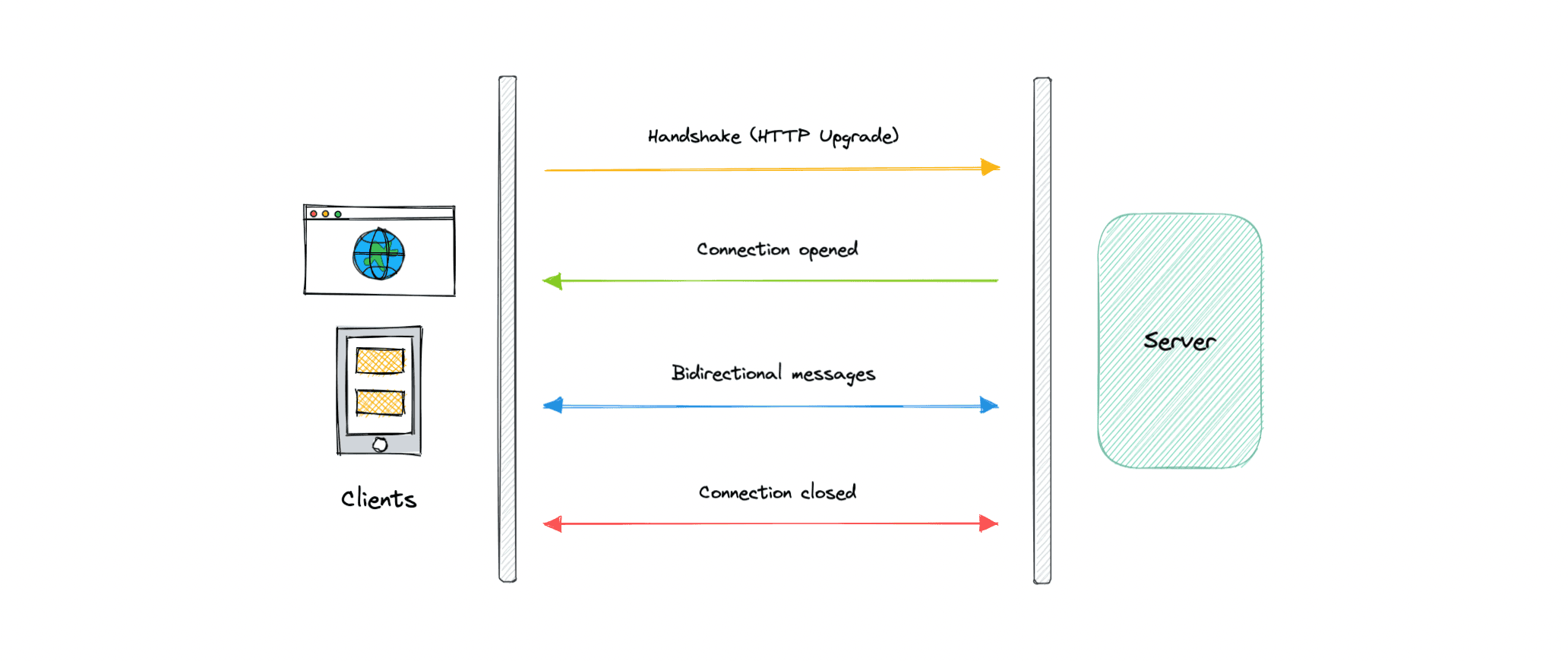
- WebSocket provides full-duplex communication channels over a single TCP connection. It is a persistent connection between a client and a server that both parties can use to start sending data at any time.
-
The client establishes a WebSocket connection through a process known as the WebSocket handshake. If the process succeeds, then the server and client can exchange data in both directions at any time. The WebSocket protocol enables the communication between a client and a server with lower overheads, facilitating real-time data transfer from and to the server.
-
Initial handshake causes HTTP upgrade to
ws:// -
Connection closed when either one decides.
Advantages
- full duplex async messaging
- lighweight for both client and server
Disadvantages
- complex than HTTP
- not optimized for streaming audio and video data. A technology like WebRTC is better suited in these scenarios.
- Terminated connections aren't automatically recovered.
- are stateful hence hard to use in large-scale systems as we need to share connection state across servers
Server-Sent Events (SSE)
- Server-Sent Events (SSE) is a way of establishing long-term communication between client and server that enables the server to proactively push data to the client.
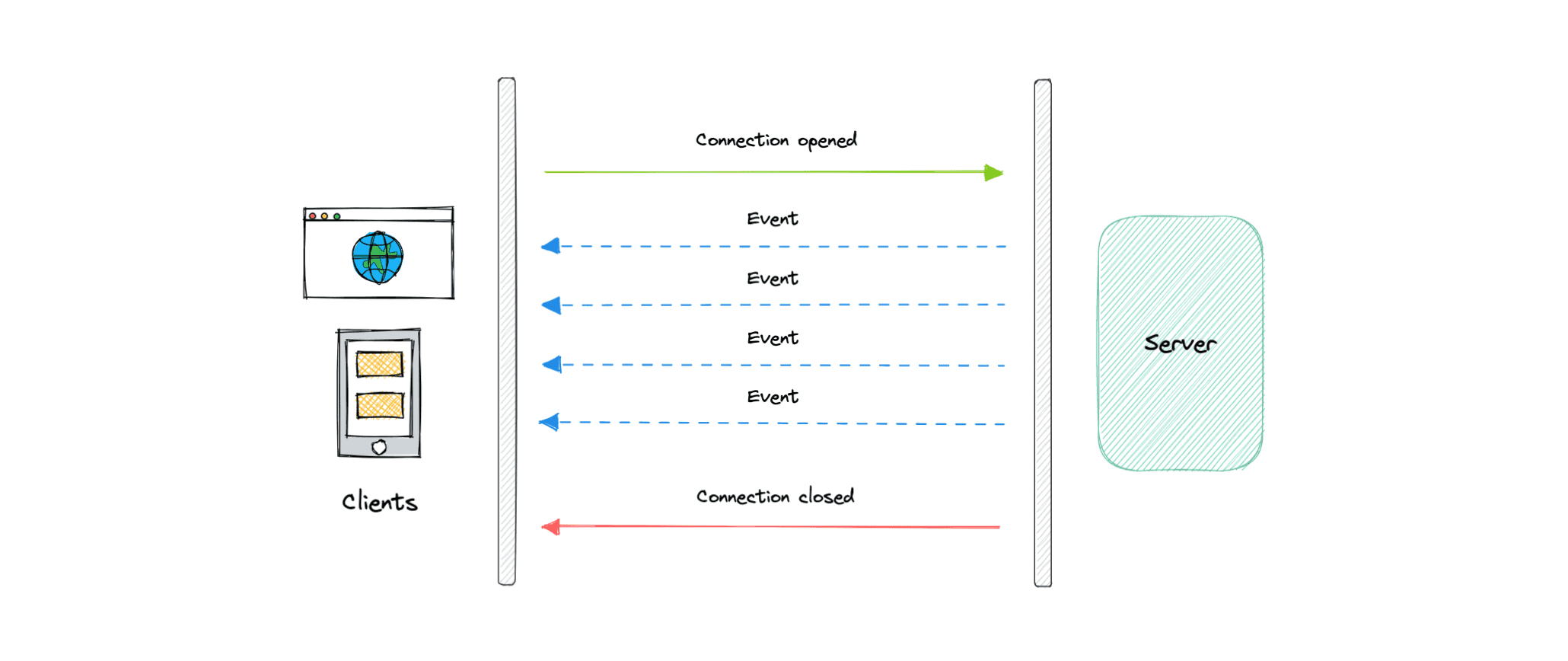
- It is unidirectional, meaning once the client sends the request it can only receive the responses without the ability to send new requests over the same connection.
Advantages
- Simple to implement and use for both client and server.
- Supported by most browsers.
Disadvantages
- Unidirectional nature can be limiting.
- Limitation for the maximum number of open connections.
- Does not support binary data