Networking
IP
- IP: Internet Protocol
- Identifies a device on the internet or local network
- Set of rules governing the format of data sent via the internet or local network
Versions
-
IPv4
- 32-bit
-
IPv6
- 128-bit
Types
-
Public
- one primary address is associated with our whole network
- each of the connected device has the same IP address
- eg. IP address provided to our router by the ISP
-
Private
- unique IP assigned to every device that connects to our network
- eg. IP address generated by the home router for our devices
-
Static
- A static IP address doesn't changes and is one that was manually created, as opposed to be assigned
- These are more expensive but more reliable
- eg. Reliable geo-location service, remote access, server hosting
-
Dynamic
- Dynamic IP address changes from time to time and is not always the same
- Assigned by DHCP (Dynamic Host Configuration Protocol) server
- They are cheaper to deploy and allow us to reuse the IP addresses within a network as needed
- eg. Commonly used for personal use
OSI Model
- OSI: Open Systems Interconnection
- logical and conceptual model that defines network communication used by systems open to interconnection and communication with other systems
- 7 layers
Why does it matters?
- Even though it is not a practical model, it helps lay down the underlying aspects like:
- essential for developing a security-first mindset
- makes troubleshooting easier and help identify threats across the entire stack
- seperate a complex function into simpler components
Layers
| No | Layers | Work |
|---|---|---|
| 7 | Application Layer | HTTP/FTP/etc |
| 6 | Presentation Layer | Translation,encrypt/decrypt, compression |
| 5 | Session Layer | ensures session stays open long enough to transfer all the data being exchanged |
| 4 | Transport Layer | TCP/IP |
| 3 | Network Layer | IP (packets) |
| 2 | Data Link Layer | Frames |
| 1 | Physical Layer | Bytes |
TCP
- TCP: Transmission Control Protocol
- connection-oriented: once a connection is established, data can be transmitted in both directions
- has built-in error checks and gurantees the order making it perfect for sending images, audios, web pages, files
Info
Even though TCP is reliable, its feedback mechanism also result in a larger overhead, leading to greater use of bandwidth.
UDP
- UDP: Unigram Data Protocol
- Simpler, connectionless IP in which error-checking and recovery services are not required
- No overhead for opening a connection, maintaining or terminating a connection
- Data is continuously sent to the recipient, whether or not they recieve it
- largely preferred for real-time communication like broadcast or multicast network transmission
Info
Use UDP over TCP when low latency is required and where late data is worse than loss of data.
TCP vs UDP
| Feature | TCP | UDP |
|---|---|---|
| Connection | Requires an established connection | Connectionless protocol |
| Guaranteed delivery | Can guarantee delivery of data | Cannot guarantee delivery of data |
| Re-transmission | Re-transmission of lost packets is possible | No re-transmission of lost packets |
| Speed | Slower than UDP | Faster than TCP |
| Broadcasting | Does not support broadcasting | Supports broadcasting |
| Use cases | HTTPS, HTTP, SMTP, POP, FTP, etc | Video streaming, DNS, VoIP, etc |
DNS (Domain Name System)
- Humans are more comfortable with names than numbers
- DNS is hierarchical and naming system used for translating human-readable domain name to IP addresses
Server Types
-
4 key groups of servers that make up the DNS infrastructure:
- DNS Resolver
- DNS Root Server
- TLD nameserver
- Authoritative DNS Server
-
DNS Resolver
- First stop in a DNS query
- Acts as a middleman between the client and a DNS nameserver
- Either responds with cached data or sends a request to a:
- root nameserver; followed by another request to
- TLD nameserver; followed by last req to
- authoritative nameserver for the IP address
-
DNS Root Server
- accepts a recursive resolver's query which includes a domain name and the root nameserver responds by directing the resolver to a TLD nameserver, based on the extension of that domain:
.com,.net,.orgetc. - Total DNS Root nameservers: 13
- accepts a recursive resolver's query which includes a domain name and the root nameserver responds by directing the resolver to a TLD nameserver, based on the extension of that domain:
-
TLD Nameserver
- maintains info for all the domain names that share a common domain extension such as
.com,.net - Two main groups:
- Generic Top-Level Domain
.com,.org,.net
- Country code Top-Level Domain
.jp,.uk
- Generic Top-Level Domain
- maintains info for all the domain names that share a common domain extension such as
-
Authoritative DNS server
- usually the resolvers last step in the journey for an IP address
- contains information specific to the domain name it servers and provides the IP address
Record Types
DNS records (zone files) live in authoritative DNS servers and provide info about a domain including which IP address is associated with that domain and how to handle requests for that domain.
-
All DNS records also have a TTL, how often a DNS server will refresh that record
-
Some common types:
- A (address record): holds the IP address of a domain
- AAAA (for IPv6): holds for IPv6
- CNAME (canonical name record): forwards one domain or subdomain to another domain
- MX (mail exchanger record): directs mail to a mail server
- TXT (text record): for email security; lets admin store text notes in the record
- NS (name server record): stores the name server for a DNS entry
- CERT (certificate record): stores public key certificates
- PTR (Reverse-lookup Pointer record): Provides a domain name in reverse lookups
Info
Subdomain
blog.example.com:blogis the sub-domain
DNS Zones
- logical entity within the domain namespace of the DNS
- Allows granular control of DNS components such as authoritative name servers
DNS Caching
- sometimes called resolver cache
- temp database maintained by computer's OS, that contains records of all the recent visits and attempted visites to websites and other internet domains.
- In other words, a memory of recent DNS lookups that our computer can quickly refer to when it's trying to figure out how to load a website
- TTL is here.
Reverse DNS
- A reverse DNS lookup is a DNS query for the domain name associated with a given IP address
- Opposite of DNS lookup
- Reverse DNS process uses PTR records. If the server doesnt have it, it cannot resolve a reverse lookup
- Mainly used by email servers.
Important
Email servers check and see if an email message came from a valid server before bringing it onto their network. Many email servers will reject messages from any server that does not support reverse lookups or from a server that is highly unlikely to be legitimate.
Load Balancer
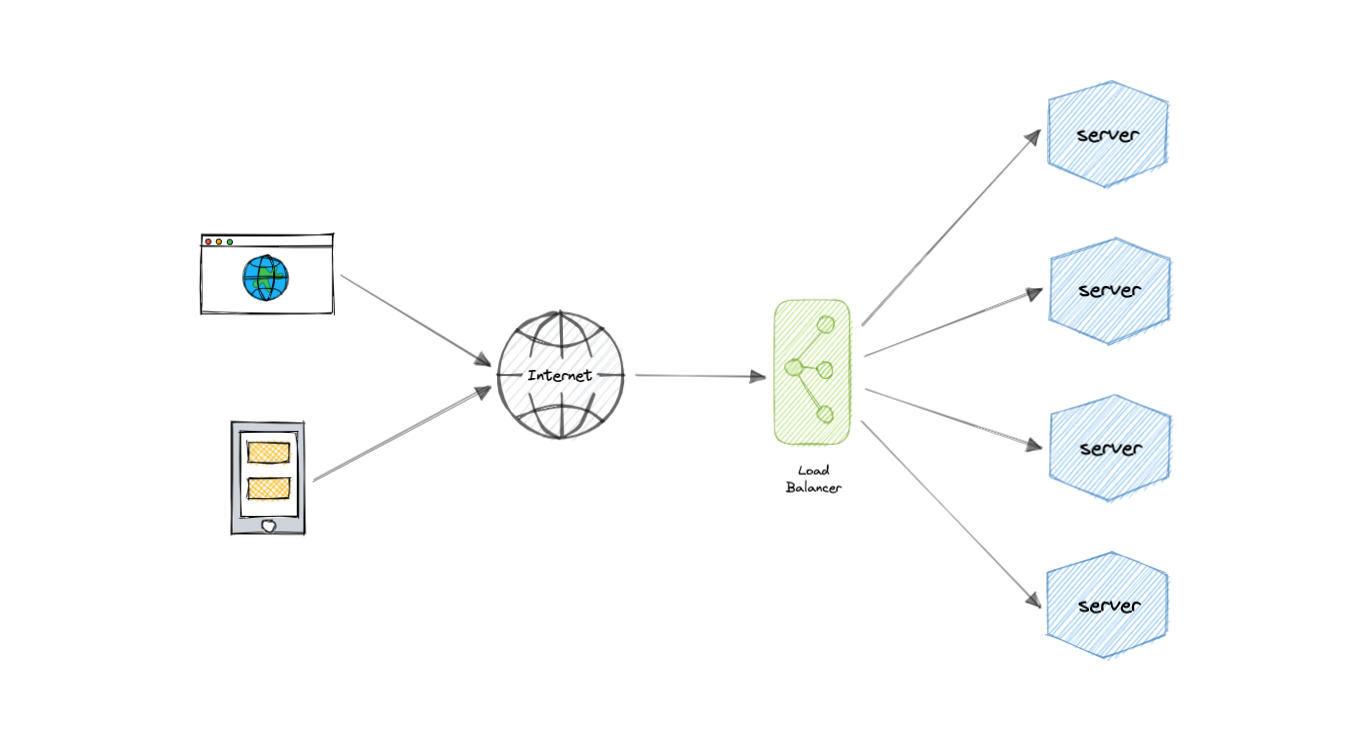
- Lets us distribute incoming network traffic across multiple resources ensuring high availability and reliability by sending requests only to resources that are online.
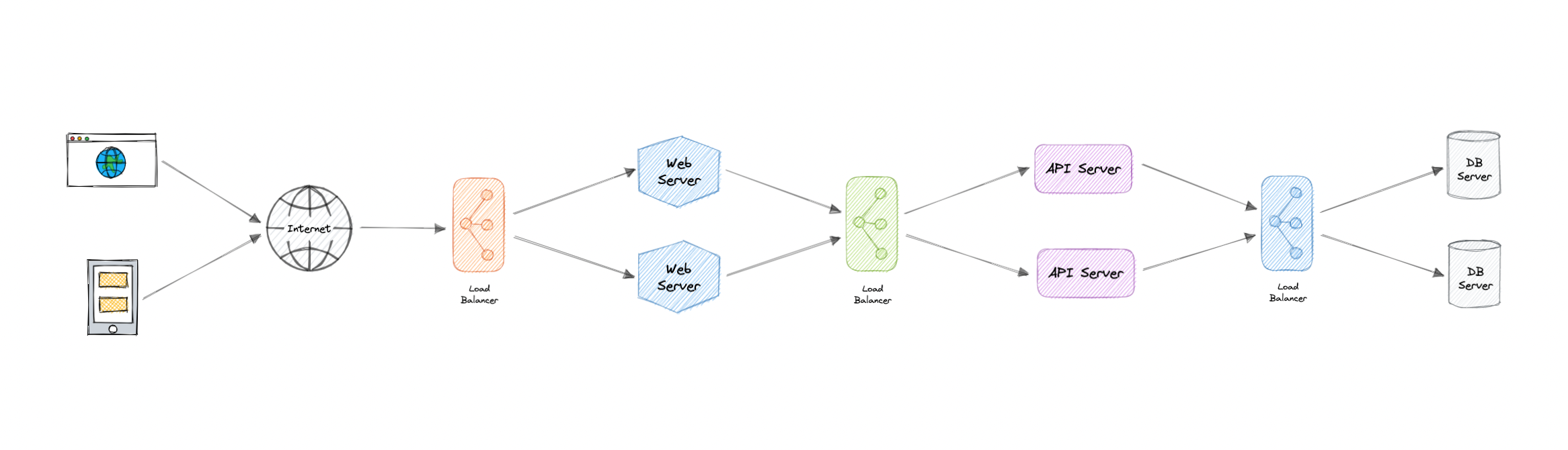
- Load balancing at multiple layers of the system
Why?
-
Modern high-traffic websites must serve hundreds of thousands, if not millions, of concurrent requests from users or clients.
-
To cost-effectively scale to meet these high volumes, modern computing best practice generally requires adding more servers.
-
Load Balancer sits in front of them and routes all the incoming requests to multiple servers ensuring reliability and scalabiliy.
-
We can Round-Robin the requests, Least Load the requests.
Layers
-
LB operate at one of the two levels:
-
Network Layer (Layer 4)
- performs routing based on networking information such as IP addresses
- No content-based routing
-
Application Layer (Layer 7)
- Has content-based routing
-
Routing Algos
- Round-Robin
- Weighted Round-Robin
- Least Connections
- Least Response Time
Advantages
- Scalability
- Redundancy
- Flexibility
- Efficiency
- Sticky Sessions
- Healthchecks
- Encryption
- Caching (Application-layer LB)
- Redirects
Redundant LBs
- LBs themselves can be a single point of failure.
- To overcome this, multiple LBs can be employed.
- Active and Passive
Clustering
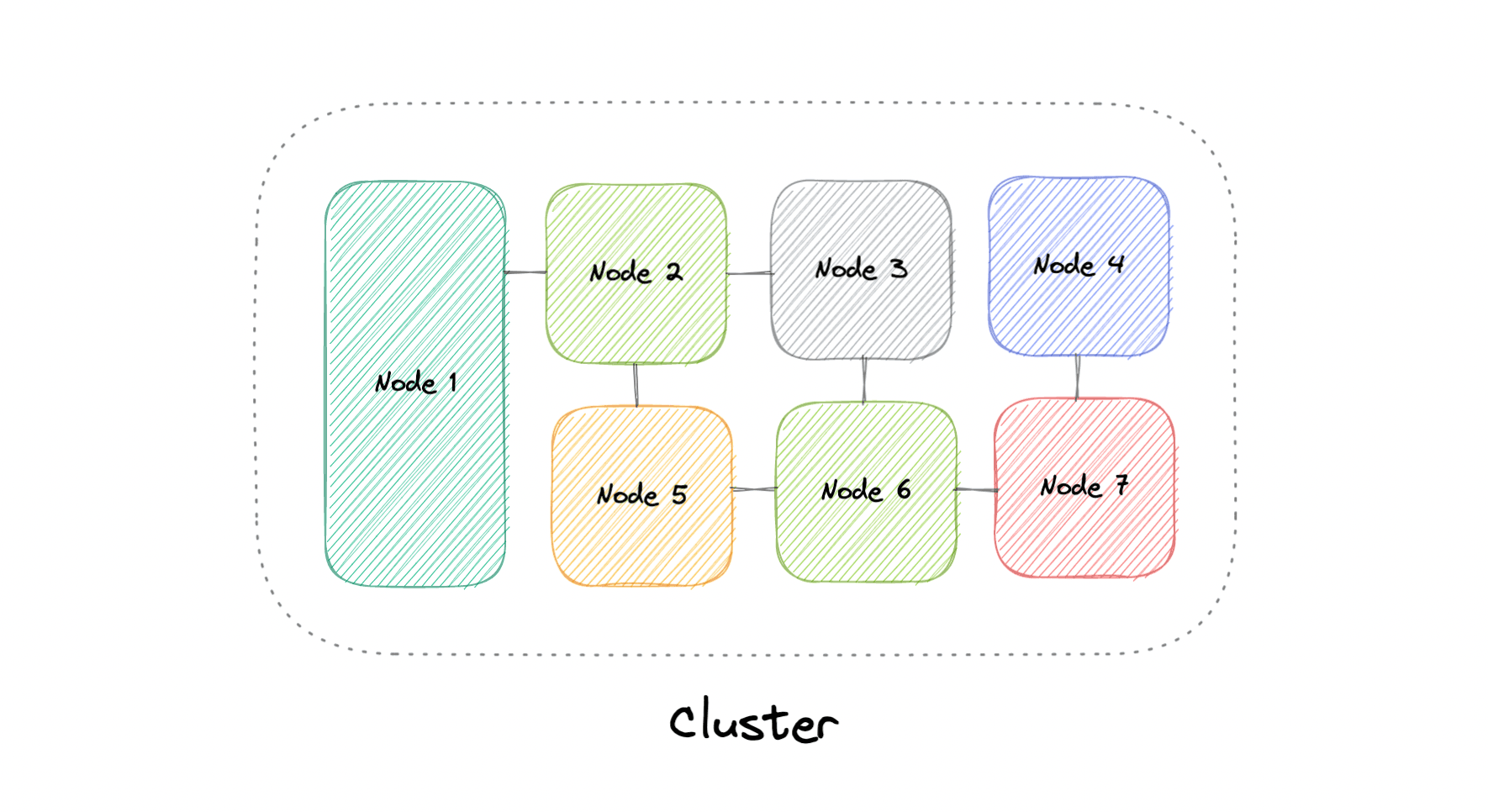
- A computer cluster is a group of two or more computers, or nodes, that run in parallel to achieve a common goal.
- This allows workloads consisting of a high number of individual, parallelizable tasks to be distributed among the nodes in the cluster.
- As a result, these tasks can leverage the combined memory and processing power of each computer to increase overall performance.
-
To build a computer cluster, the individual nodes should be connected to a network to enable internode communication. The software can then be used to join the nodes together and form a cluster. It may have a shared storage device and/or local storage on each node.
-
Ideally, a cluster functions as if it were a single system. A user accessing the cluster should not need to know whether the system is a cluster or an individual machine. Furthermore, a cluster should be designed to minimize latency and prevent bottlenecks in node-to-node communication.
Types
- 3 types:
- Highly Available or fail-over
- Load Balancing
- High-performance Computing
Configurations
Two most commonly used HA configurations are:
-
Active-Active
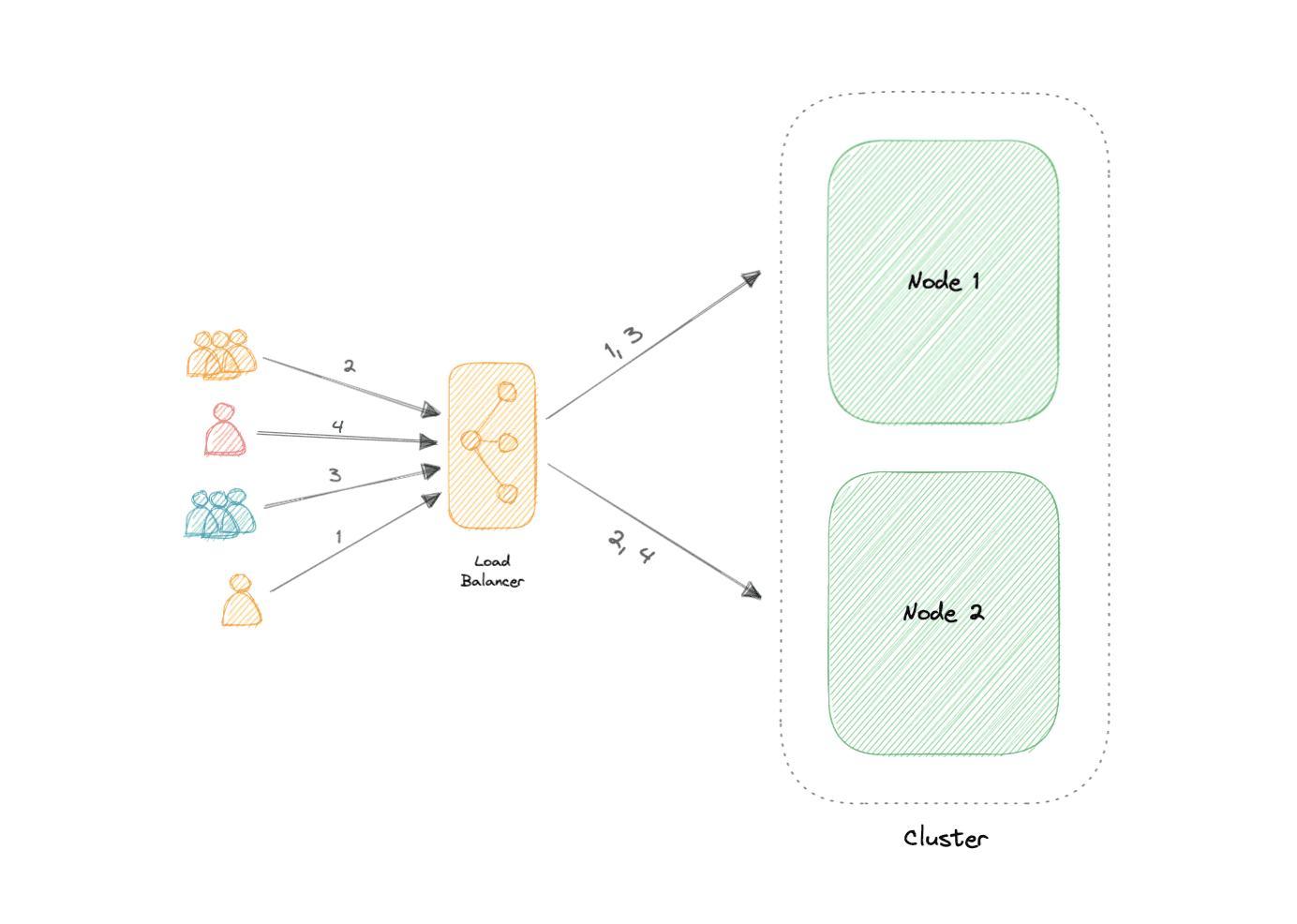
- An active-active cluster is typically made up of at least two nodes, both actively running the same kind of service simultaneously.
- The main purpose of an active-active cluster is to achieve load balancing. A load balancer distributes workloads across all nodes to prevent any single node from getting overloaded.
- Because there are more nodes available to serve, there will also be an improvement in throughput and response times.
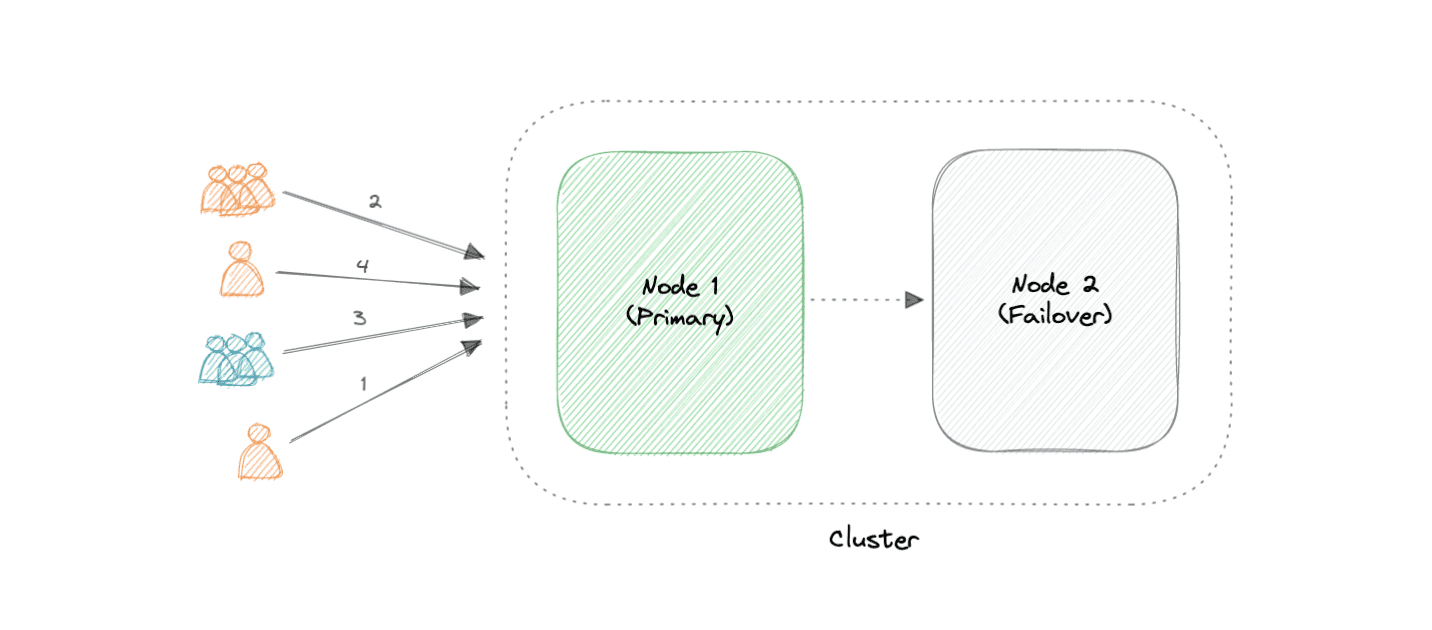
- Active-Passive
- at least two nodes.
- In the case of two nodes, if the first node is already active, then the second node must be passive or on standby.
Advantages
- HA
- Scalability
- FT
- Performance
LB vs Clustering
- servers in cluster are aware of each other and work together towards a common purpose
- in LB, servers are not aware of each other. Instead, they react to the requests they recieve from the LB.
Challenges
- Clustering increases complexity
- OS installation on each node
- worry about the storage and distributed access to the storage
- managing storage
- Resource utilization should be closely monitored and logs be collected.
Example
-
Containers: k8, ECS
-
Databases: Cassandra, MongoDB
-
Cache: Redis
Caching
-
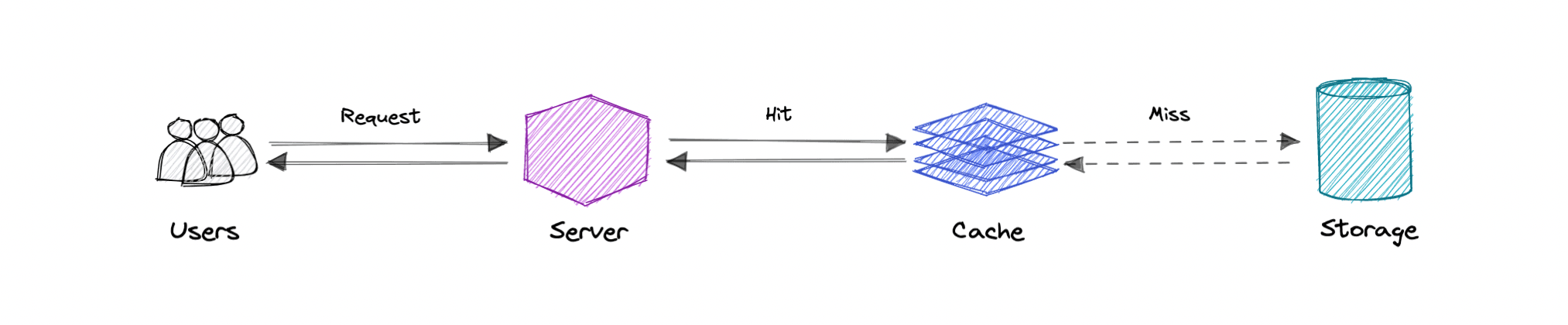
Primary purpose: increase data retrieval performance by reducing the need to access the underlying slower storage layer
-
Trades off capacity for speed
-
Based on: recently requested data is likely to be requested again
-
Data is stored in the hierarchy of levels: L1, L2, L3, the more farther, the more time it takes to find.
-
Cache is read from and written to one block at a time. Each block has a tag that includes the location where the data was stored in the cache.
-
When the data is requested from the cache, a search occurs through tags to find the specific content.
Cache hit and miss
Cache-Hit
- A cache hit describes the situation where content is successfully served from the cache.
- The tags are searched in the memory rapidly, and when the data is found and read, it's considered a cache hit.
- Cold cache-hit
- slowest possible rate for data to be read
- found in lower memory hierarchy like L3 or lower
- Hot cache-hit
- data read from the memory at the fastest possible rate
- retrieved from L1
- Warm cache-hit
- found in L2 or L3
- faster than cold cache-hit
Cache-Miss
- A cache miss refers to the instance when the memory is searched, and the data isn't found. When this happens, the content is transferred and written into the cache.
Cache Invalidation
- process when the computer system declares the cache entries as invalid and removes or replaces them
- If not done, can cause inconsistent app behavior.
-
3 kinds of caching systems:
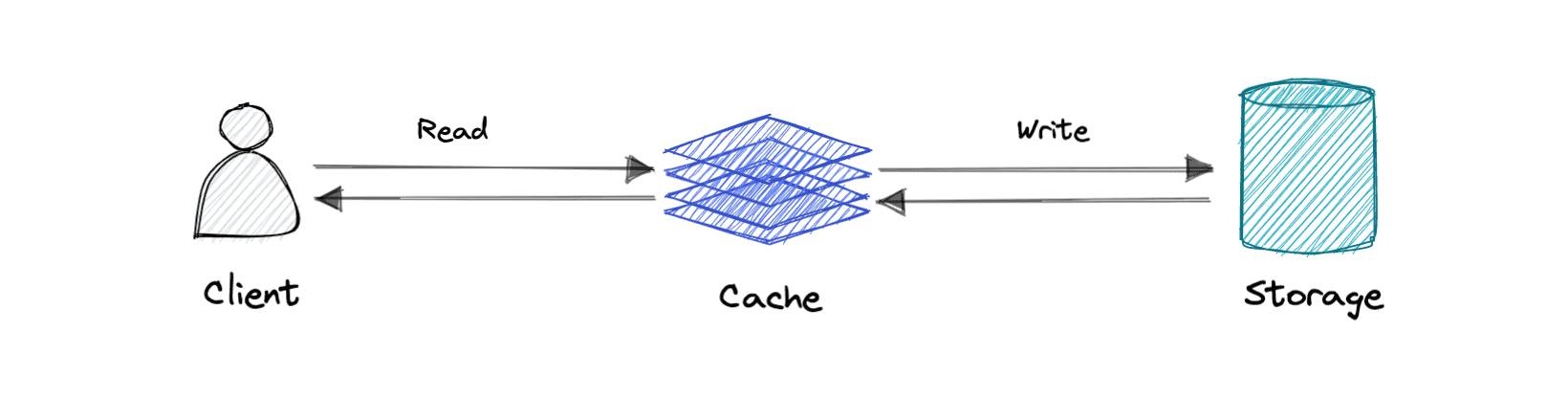
- Write-through cache
- Data is written into cache and then to the db
- Pro: Fast retrieval, complete data consistency b/w cache and storage
- Con: higher latency for write operations
-
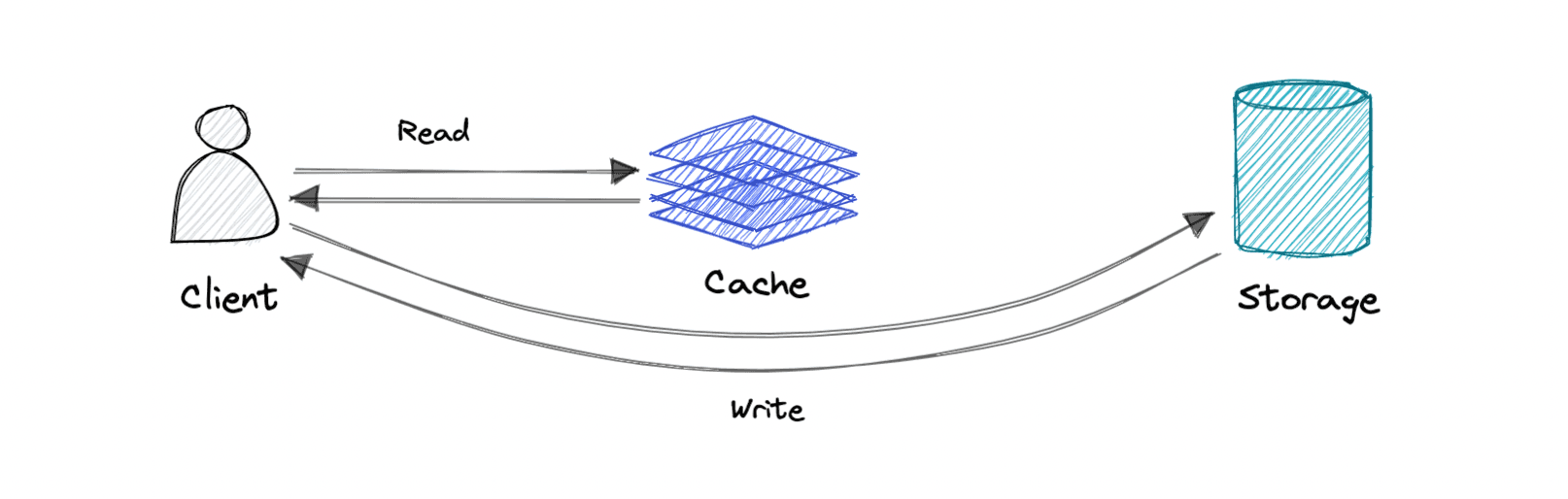
Write-around cache
-
Write directly goes to the db or permanent storage, bypassing the cache
-
Pro: reduces latency
- Con: increases cache-misses.
-
- Write-back cache
- When write is only done to the caching layer and then db is updated async.
- Pro: reduced latency and high throughput for write-intensive apps
- Con: risk of data loss in case the caching layer crashes. Improve it by having read-replicas
- Write-through cache
Eviction Policies
-
The eviction policy determines what happens when a database reaches its memory limit.
-
FIFO: cache evicts the first block accessed first without any regard to how often or how many times it was accessed before
- LIFO: most recently one
- LRU (Least Recently Used): discards the least recently used items first
- LFU (Least Frequently Used)
- Random Replacement (RR)
Distributed Cache
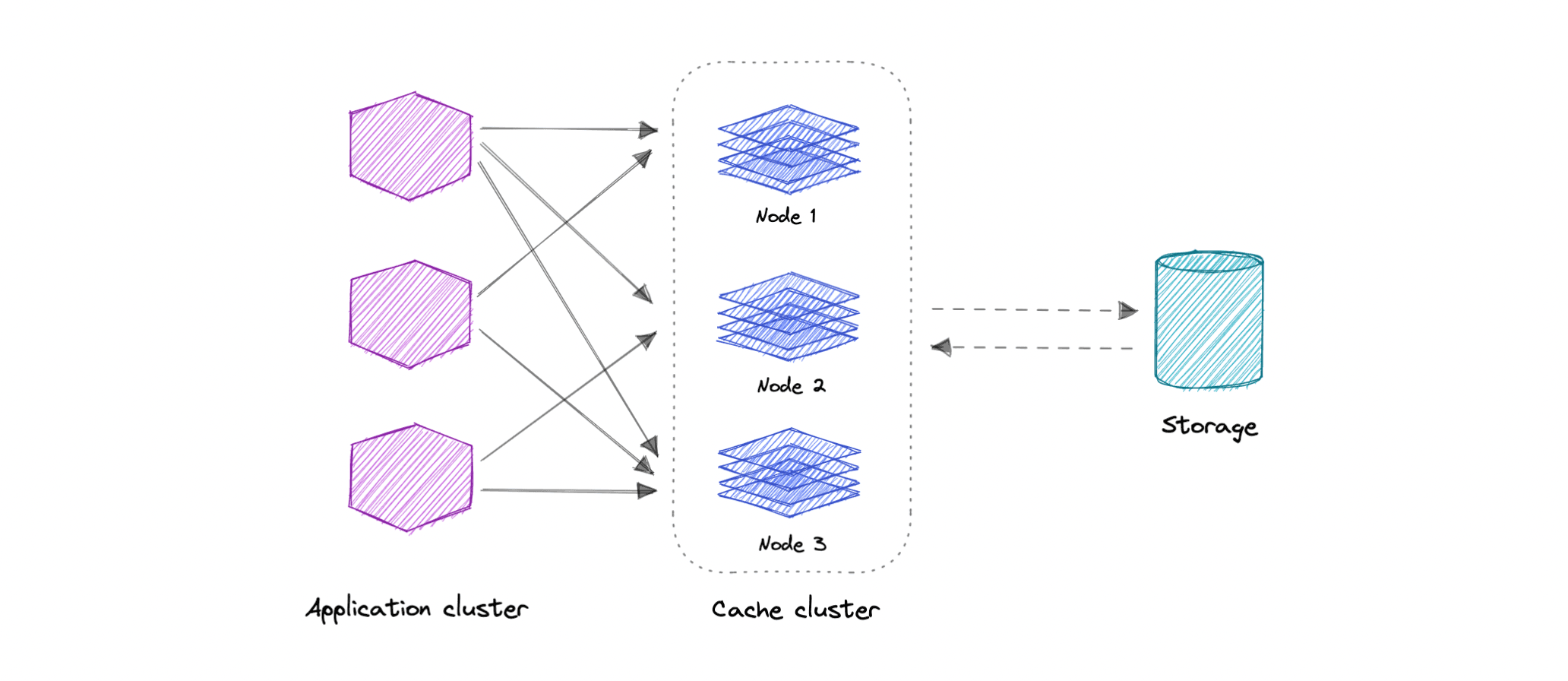
- A distributed cache is a system that pools together the random-access memory (RAM) of multiple networked computers into a single in-memory data store used as a data cache to provide fast access to data. While most caches are traditionally in one physical server or hardware component, a distributed cache can grow beyond the memory limits of a single computer by linking together multiple computers.
Global Cache
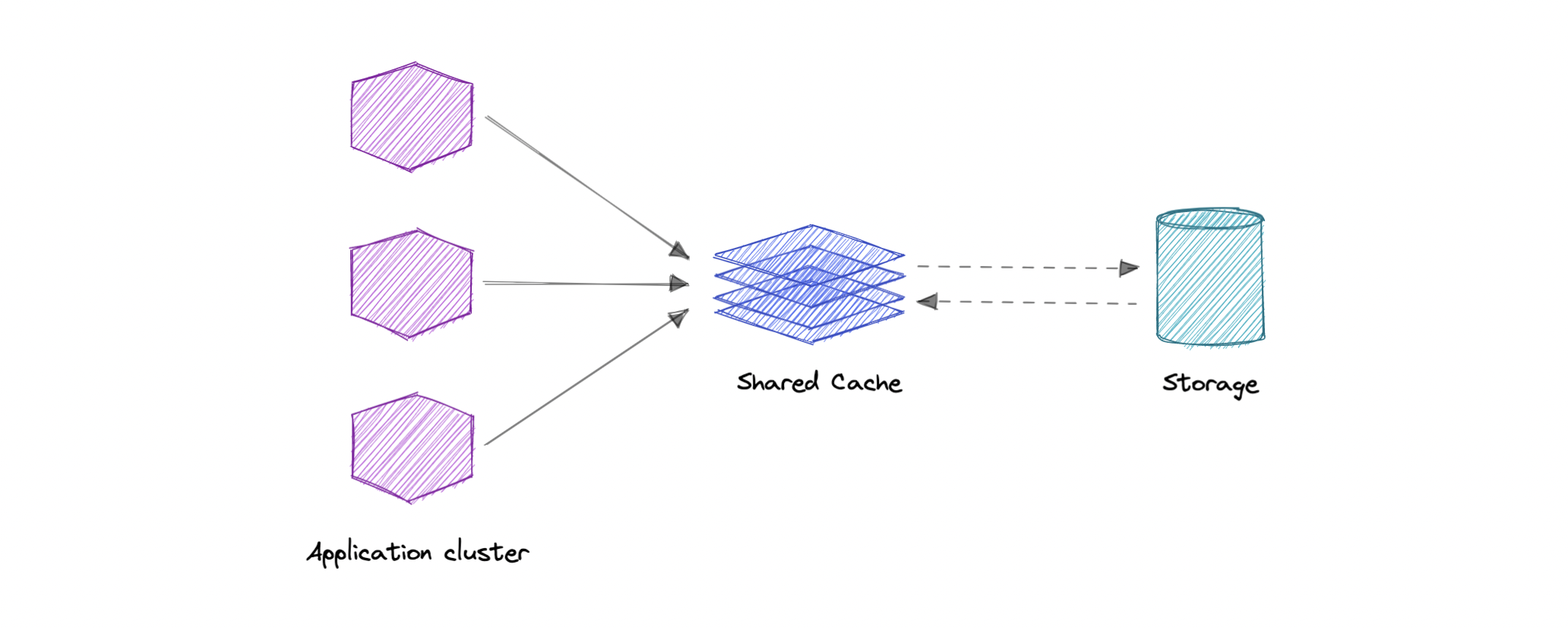
- We have a single shared cache that all the application nodes will use. When the requested data is not found in the global cache, it's the responsibility of the cache to find out the missing piece of data from the underlying data store.
Use Cases
- Db Caching
- CDN
- DNS Caching
- API Caching
When not to use caching?
- if it takes just as long to access the cache as it does to access the primary data store
- doesn't work well when requests have low repetition
- not helpful when data changes frequently
Advantages
- Improves performance
- Reduces latency
- Reduces load on db
- Reduces network cost
- Increases read throughput
CDN
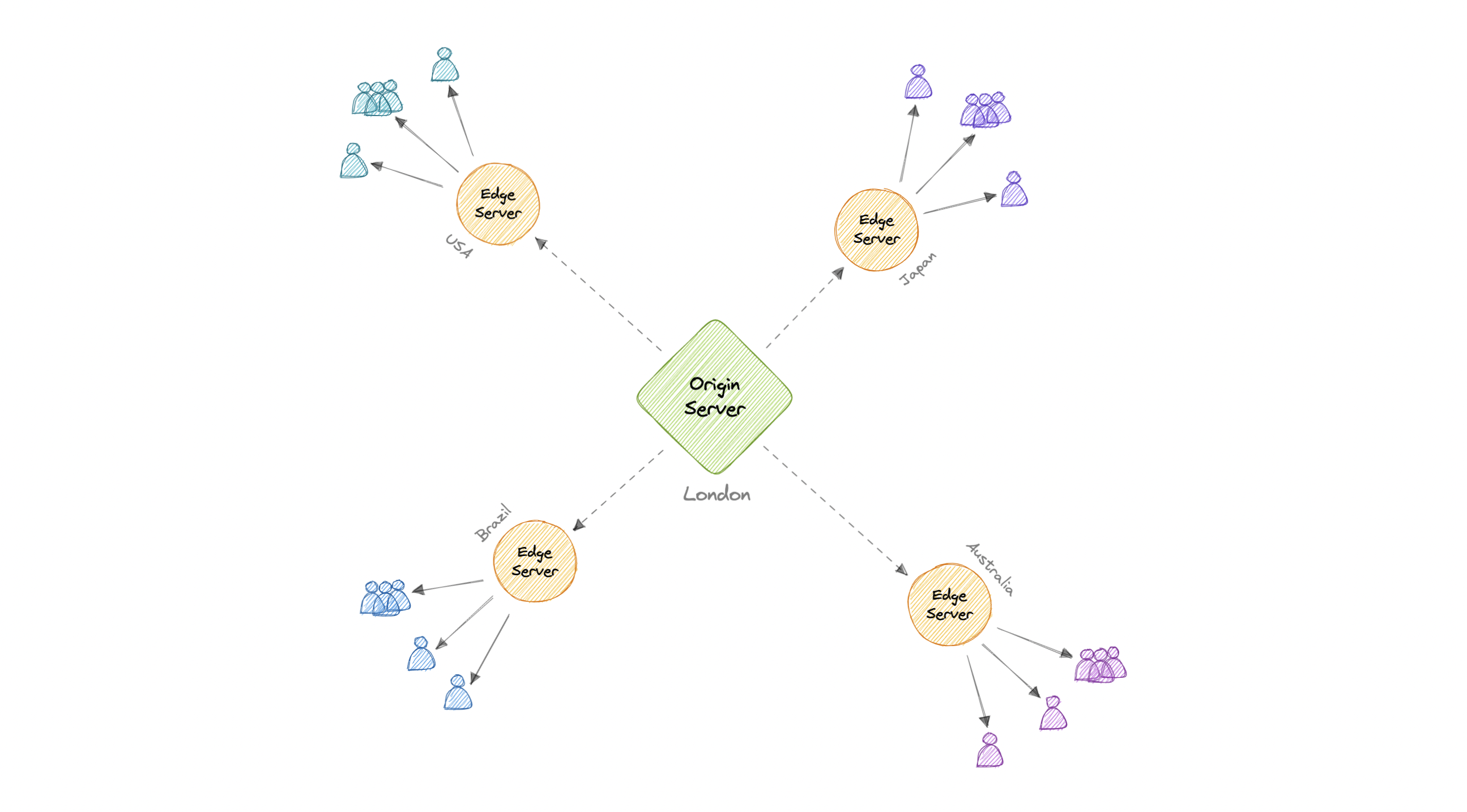
A content delivery network (CDN) is a geographically distributed group of servers that work together to provide fast delivery of internet content. Generally, static files such as HTML/CSS/JS, photos, and videos are served from CDN.
- Serving content from CDNs can significantly improve performance as users receive content from data centers close to them and our servers do not have to serve requests that the CDN fulfills.
-
To minimize the distance between the visitors and the website's server, a CDN stores a cached version of its content in multiple geographical locations known as edge locations. Each edge location contains several caching servers responsible for content delivery to visitors within its proximity.
-
Once the static assets are cached on all the CDN servers for a particular location, all subsequent website visitor requests for static assets will be delivered from these edge servers instead of the origin, thus reducing the origin load and improving scalability.
Types
-
2 types:
-
Push CDNs
- Push CDNs receive new content whenever changes occur on the server.
- Sites with small amount of traffic or sites with content that isn't often updated work well with push CDNs
-
Pull CDNs
- Cache is updated based on request
- When the client sends a request that requires static assets to be fetched from the CDN if the CDN doesn't have it, then it will fetch the newly updated assets from the origin server and populate its cache with this new asset, and then send this new cached asset to the user.
-
Disadvantages
- costs could be significant depending on traffic
- if the audience is located in a country where the CDN has no servers, then data may need to travel far more
Proxy
- A proxy server is an intermediary piece of hardware/software sitting between the client and the backend server. It receives requests from clients and relays them to the origin servers. Typically, proxies are used to filter requests, log requests, or sometimes transform requests (by adding/removing headers, encrypting/decrypting, or compression).
Types
-
2 types:
-
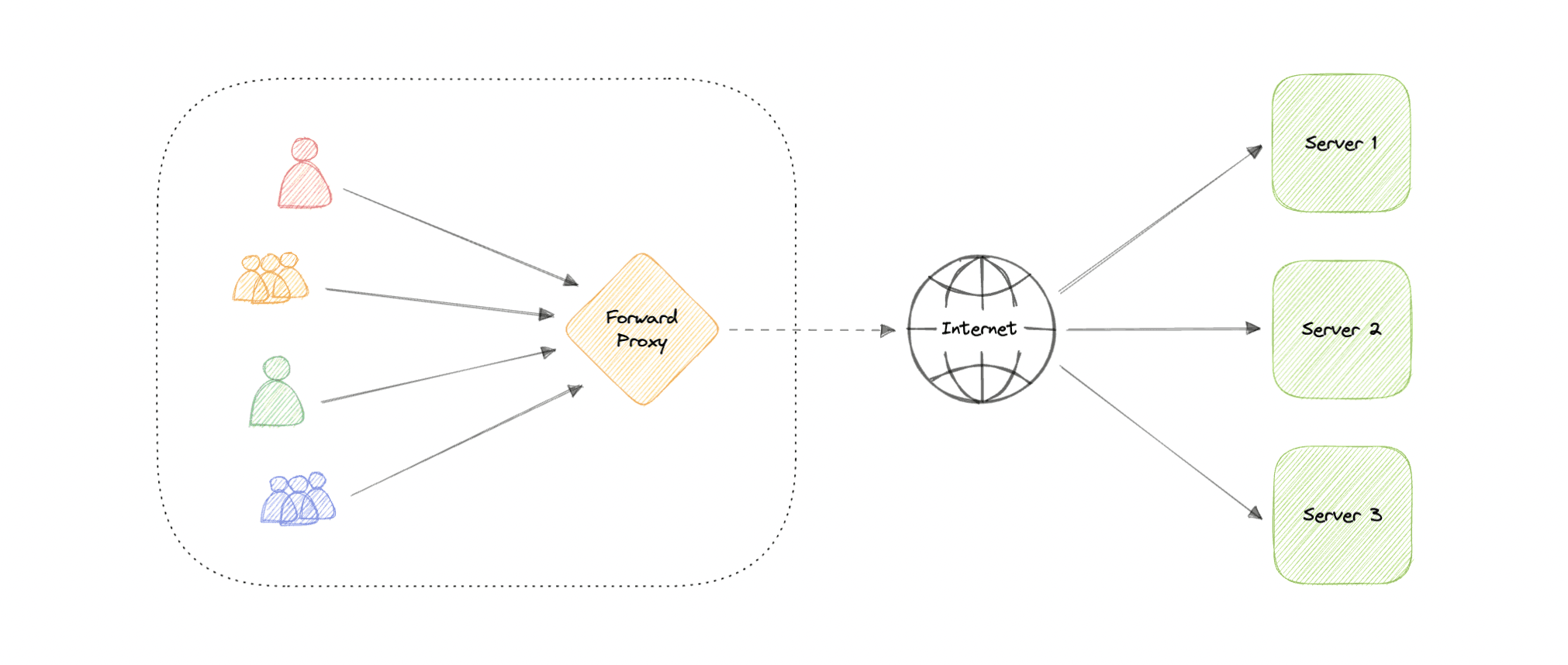
Forward Proxy
- often called proxy, proxy server
- sits in front of a group of client machines
- client make req to sites and services on the internet, the proxy server intercepts those requests and then communicates with the web servers on behalf of those client, like middleman
- Advantages:
- Block access to certain content
- provides anonymity (but can still track our personal info)
- avoid other browsing restrictions
-
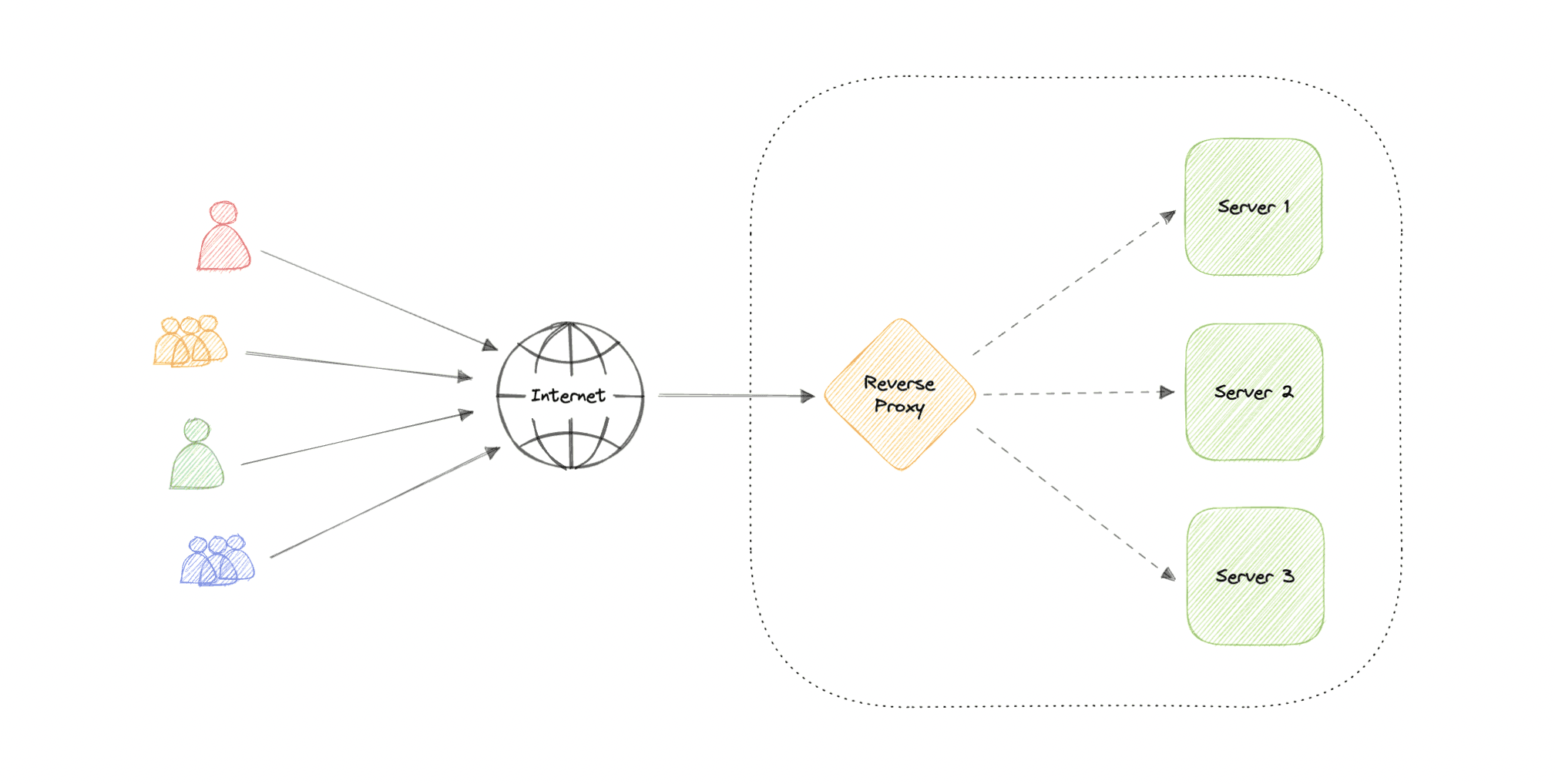
Reverse Proxy
- sits in front of the web servers
- client send req to the origin server of the website, those req are intercepted by the reverse proxy server
- Advantages:
- Improved security
- caching
- LB
- Scalability and flexibility
-
Info
Difference b/w Forward & Reverse Proxy
-
A forward proxy sits in front of a client and ensures that no origin server ever communicates directly with that specific client.
-
On the other hand, a reverse proxy sits in front of an origin server and ensures that no client ever communicates directly with that origin server.
Info
Load Balancer vs Reverse Proxy
-
A load balancer is useful when we have multiple servers. Often, load balancers route traffic to a set of servers serving the same function, while reverse proxies can be useful even with just one web server or application server.
-
A reverse proxy can also act as a load balancer but not the other way around.
Availability
-
It is a measure of the percentage of time that a system, service, or machine remains operational under normal conditions.
-
Quantified by uptime (or downtime) as a percentage of time the service is available. Generally measure in the number of 9s:
Availability in Sequence vs Parallel
If a service consists of multiple components prone to failure, the service's overall availability depends on whether the components are in sequence or in parallel.
Sequence
Overall availability decreases when two components are in sequence.
For example, if both Foo and Bar each had 99.9% availability, their total availability in sequence would be 99.8%.
Parallel
Overall availability increases when two components are in parallel.
For example, if both Foo and Bar each had 99.9% availability, their total availability in parallel would be 99.9999%.
Availability vs Reliability
- If system is reliable, it is available.
- If available, not necessarily reliable.
- HR -> HA
- but possible to achieve HA with an unreliable system.
HA vs FT
-
methods for providing high uptime levels but accomplish the objective differently
-
A fault-tolerant system has no service interruption but a significantly higher cost, while a highly available system has minimal service interruption.
-
Fault-tolerance requires full hardware redundancy as if the main system fails, with no loss in uptime, another system should take over.
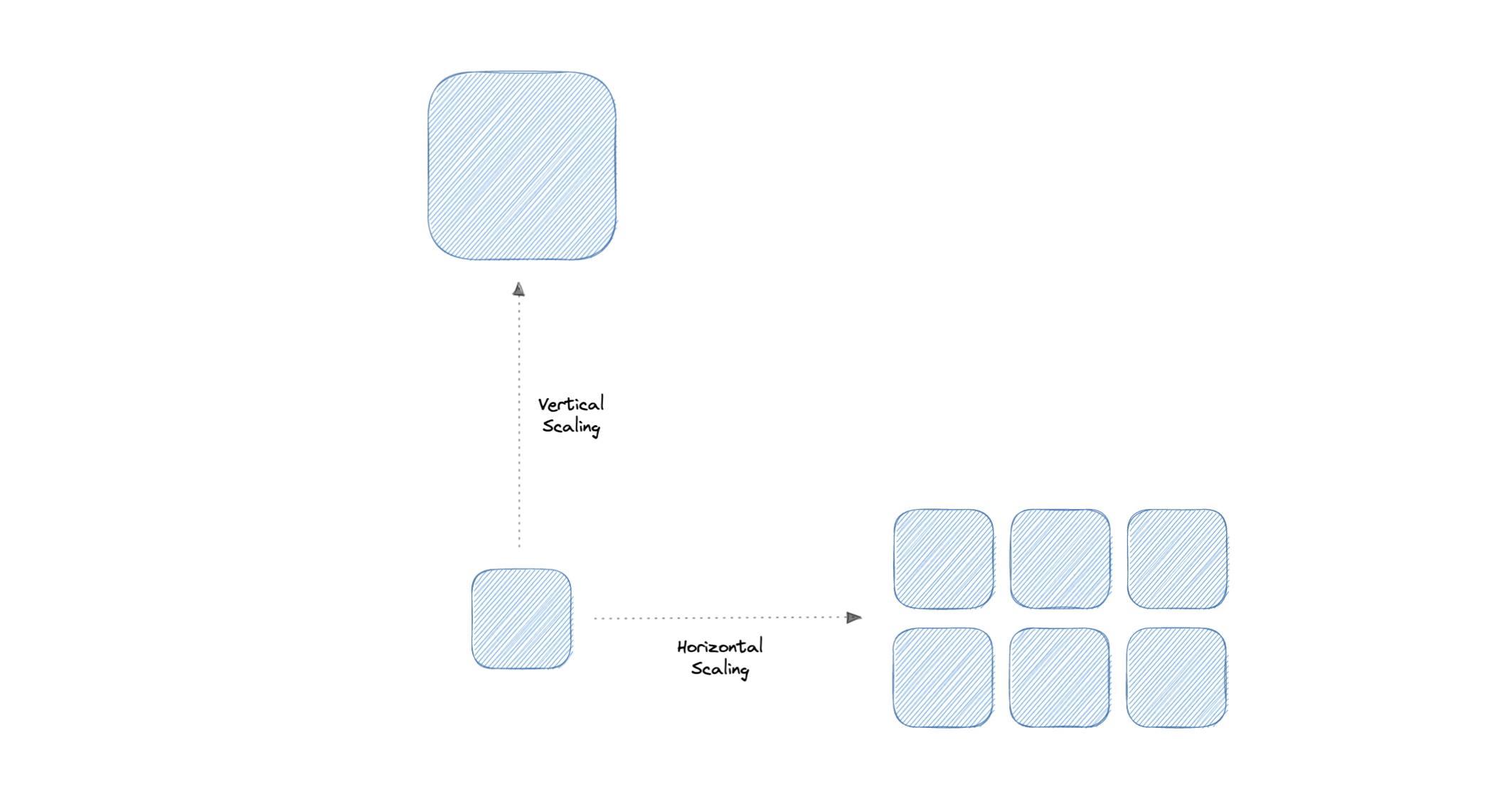
Scalability
- how well a system responds to changes by adding or removing resources to meet demands
Storage
- retain data permanently or temporarily
RAID
- RAID (Redundant Array of Independent Disks) is a way of storing the same data on multiple hard disks or solid-state drives (SSDs) to protect data in the case of a drive failure.
Volumes
- Volume is a fixed amount of storage on a disk or tape. The term volume is often used as a synonym for the storage itself, but it is possible for a single disk to contain more than one volume or a volume to span more than one disk.
File Storage
-
File storage is a solution to store data as files and present it to its final users as a hierarchical directories structure. The main advantage is to provide a user-friendly solution to store and retrieve files. To locate a file in file storage, the complete path of the file is required. It is economical and easily structured and is usually found on hard drives, which means that they appear exactly the same for the user and on the hard drive.
-
Eg. EFS
Block Storage
-
Block storage divides data into blocks (chunks) and stores them as separate pieces. Each block of data is given a unique identifier, which allows a storage system to place the smaller pieces of data wherever it is most convenient.
-
Eg. EBS
Object Storage
-
breaks data files up into pieces called objects. It then stores those objects in a single repository, which can be spread out across multiple networked systems.
-
Eg. S3
NAS
- A NAS (Network Attached Storage) is a storage device connected to a network that allows storage and retrieval of data from a central location for authorized network users.
- Flexible
- Faster, less expensive
HDFS
-
The Hadoop Distributed File System (HDFS) is a distributed file system designed to run on commodity hardware. HDFS is highly fault-tolerant and is designed to be deployed on low-cost hardware.
-
HDFS provides high throughput access to application data and is suitable for applications that have large data sets.
-
HDFS is designed to reliably store very large files across machines in a large cluster. It stores each file as a sequence of blocks, all blocks in a file except the last block are the same size. The blocks of a file are replicated for fault tolerance.