Airflow
- Open-source tool for efficiently creating, scheduling and monitoring data tasks & workflows.
airflow.cfg: configuration file
Architecture

Sample Real-World UseCase
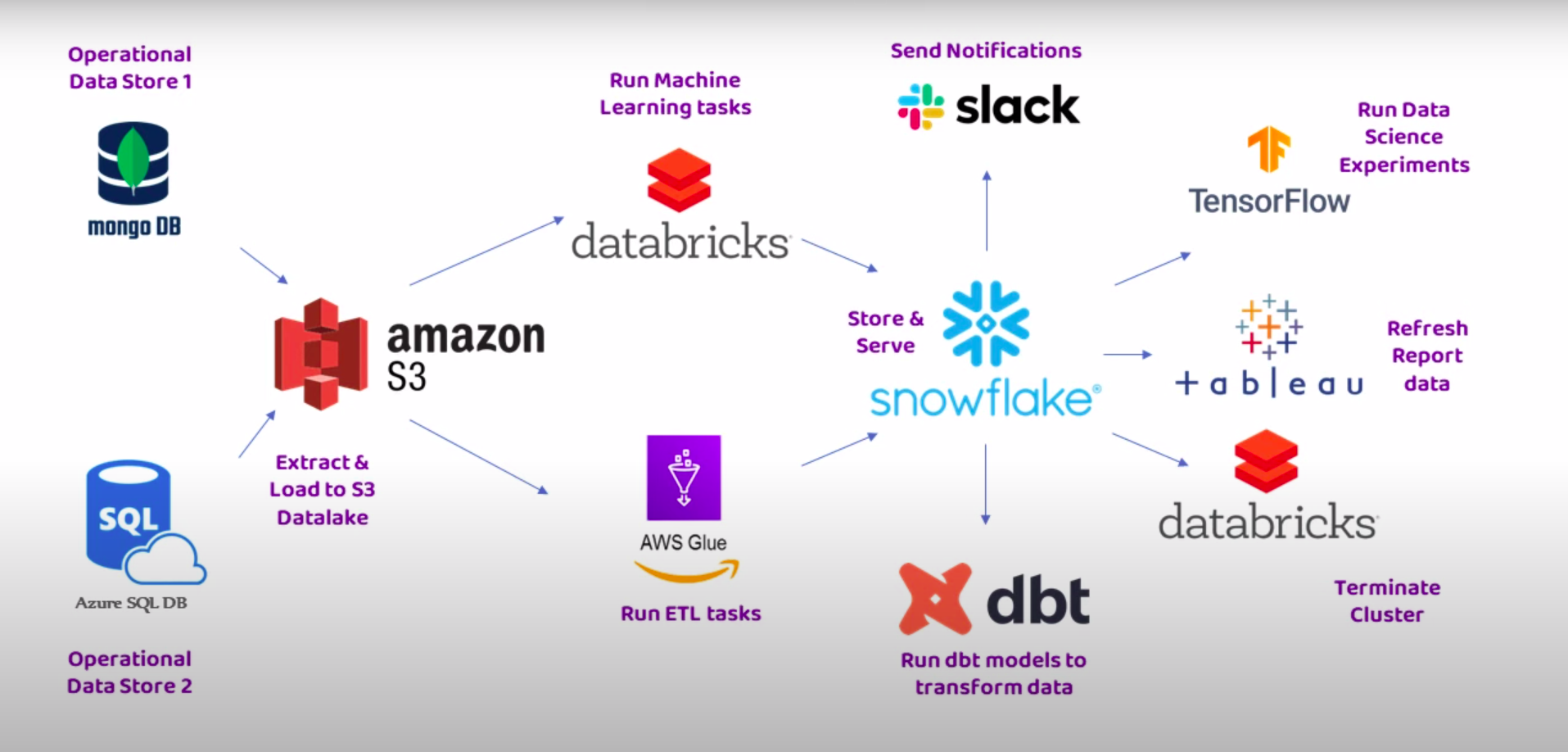
DAG (Directed Acyclic Graph)
- It is a workflow.
- Directed: Dependencies have a specific direction
- Acyclic: No cycles or loops
- Graph: Diagram consisting of nodes and edges
- DAG consists of one or more tasks.
- It can also have schedules defining when to run & intervals.
Set-up (Docker)
compose.yaml
| compose.yaml |
|---|
| #services:
# source_postgres:
# image: postgres:9.3
# ports:
# - "5433:5422"
# networks:
# - elt_network
# environment:
# POSTGRES_DB: source_db
# POSTGRES_USER: postgres
# POSTGRES_PASSWORD: secret
# destination_postgres:
# image: postgres:9.3
# ports:
# - "5434:5432"
# networks:
# - elt_network
# environment:
# POSTGRES_DB: destination_db
# POSTGRES_USER: postgres
# POSTGRES_PASSWORD: secret
x-airflow-common:
&airflow-common
image: ${AIRFLOW_IMAGE_NAME:-apache/airflow:2.0.2}
# build: .
environment:
&airflow-common-env
AIRFLOW__CORE__EXECUTOR: CeleryExecutor
AIRFLOW__CORE__SQL_ALCHEMY_CONN: postgresql+psycopg2://airflow:airflow@postgres/airflow
AIRFLOW__CELERY__RESULT_BACKEND: db+postgresql://airflow:airflow@postgres/airflow
AIRFLOW__CELERY__BROKER_URL: redis://:@redis:6379/0
AIRFLOW__CORE__FERNET_KEY: 'lvXNEIfNExmy87tANUpo75TVr3DNvq3nag5PaI2hhOw='
AIRFLOW__CORE__DAGS_ARE_PAUSED_AT_CREATION: 'true'
AIRFLOW__CORE__LOAD_EXAMPLES: 'true'
AIRFLOW__API__AUTH_BACKEND: 'airflow.api.auth.backend.basic_auth'
volumes:
- ./airflow/dags:/opt/airflow/dags
- ./airflow/logs:/opt/airflow/logs
- ./airflow/plugins:/opt/airflow/plugins
user: "${AIRFLOW_UID:-50000}:${AIRFLOW_GID:-50000}"
depends_on:
redis:
condition: service_healthy
postgres:
condition: service_healthy
services:
postgres:
image: postgres:13
environment:
POSTGRES_USER: airflow
POSTGRES_PASSWORD: airflow
POSTGRES_DB: airflow
volumes:
- postgres-db-volume:/var/lib/postgresql/data
healthcheck:
test: ["CMD", "pg_isready", "-U", "airflow"]
interval: 5s
retries: 5
restart: always
redis:
image: redis:latest
ports:
- 6379:6379
healthcheck:
test: ["CMD", "redis-cli", "ping"]
interval: 5s
timeout: 30s
retries: 50
restart: always
airflow-webserver:
<<: *airflow-common
command: webserver
ports:
- 8080:8080
healthcheck:
test: ["CMD", "curl", "--fail", "http://localhost:8080/health"]
interval: 10s
timeout: 10s
retries: 5
restart: always
airflow-scheduler:
<<: *airflow-common
command: scheduler
restart: always
airflow-worker:
<<: *airflow-common
command: celery worker
restart: always
airflow-init:
<<: *airflow-common
command: version
environment:
<<: *airflow-common-env
_AIRFLOW_DB_UPGRADE: 'true'
_AIRFLOW_WWW_USER_CREATE: 'true'
_AIRFLOW_WWW_USER_USERNAME: ${_AIRFLOW_WWW_USER_USERNAME:-airflow}
_AIRFLOW_WWW_USER_PASSWORD: ${_AIRFLOW_WWW_USER_PASSWORD:-airflow}
flower:
<<: *airflow-common
command: celery flower
ports:
- 5555:5555
healthcheck:
test: ["CMD", "curl", "--fail", "http://localhost:5555/"]
interval: 10s
timeout: 10s
retries: 5
restart: always
volumes:
postgres-db-volume:
|
Important
Make sure to do: echo -e "AIRFLOW_UID=$(id -u)\nAIRFLOW_GID=0" > .env at the same level as compose.yaml.
Important
First, run the init-airflow container before starting the other ones ie. first do: docker compose up init-airflow -d, and then do: docker compose up.
Components
airflow.cfg: configuration file; stores stuff like dags_folder etc
Task
- Operator is a blueprint while Task is the implementation.
- Instantiated by specifying a particular operator. There are a lot of them like:
- PythonOperator
- BashOperator
- DockerOperator
- SnowflakeOperator
- KubernetesPodOperator
- AzureDataFactoryRunPipelineOperator
- The operators take params. There can be different one. Example:
| task1 = BashOperator(
task_id='bash1',
bash_command='curl something',
dag=dag
)
|
Order of task execution
Bitshift Operators (>>, <<)
task1 >> task2 >> task3
set_upstream() and set_downstream() functions
task1.set_upstream(task2)
chain() function
chain(task1, task2, task3)
Operators
Action Operators
- executes something
- Like:
- PythonOperator
- BashOperator
- DockerOperator
- SnowflakeOperator
- KubernetesPodOperator
Transfer Operators
- moves data from one place to another
- Like:
- S3ToRedshiftOperator
- S3ToSnowflakeOperator
Sensor Operators
Variables
- There may be some senstive info written in the DAG script.
- We can provide such info as a variable in our dag scripts by creating a variable in the airflow.
- For that:
- Go to Admin
- Click on Variables
- And fill in the key:value pair.
- Then reference in the dag script as:
"{{ var.value.get('key_name') }}"
- Helps in:
- making dags dynamic
- making them environment specific
- security
- the ease of implementing changes
Connections
- they are configuration objects
- store the details required to connect to external systems
- For a new one:
- Go to Admin
- Go to Connections
- Add a new one.
- Then use the connection_id in the dag script.
Sensors
- if sensed or event happens, trigger the workflow
- for example, an s3 event. For S3, we can use
S3KeySensor like this:
| wait_for_file = S3KeySensor(
task_id='xxx',
bucket_name='xxx',
bucket_key='xxx',
aws_conn_id='xxx',
mode = 'poke', # poke or reschedule
timeout=60*60*5,
soft_fail=True, # if true, if timeouts, sensor task is skipped, downstream tasks are not executed and the dag is marked as success otherwise everything fails
dag=dag
)
|
- Under Admin/Pools, the running slots means the running worker. If the task spends most of its time in sleeping state, better to switch the mode from
poke to reschedule.
- In
reschedule mode, workers are associated only when it is checking or working and released when idle.
Deferrable & Triggers
- Let's say we have an S3Sensor looking for any S3 event. Now, even if it is in
reschedule mode, the worker nodes are occupied from time-to-time, deferrable creates a trigger.
- The trigger is highly optimized async function which is triggered when a S3 event occurs.
- Then that trigger triggers a worker node and performs the job allocated.
- Hence, worker node are only called when required while in the meantime the job is deferred to the triggers.
XComs
- pass data between the tasks
- can only pass small amount of data to the metadata database:
- Postgres: 1 Gb
- SQLite: 2 Gb
- MySQL: 64 Kb
- can also configure xcom to use an external storage like S3, Azure Blob Storage
- In the following code, the file in S3 will not be overwritten, instead a new file will be created
| xcom.py |
|---|
| def fetch_fn(ti):
filename = 'xxx'
ti.xcom_push(key='file', value=filename)
fetch_xrate = PythonOperator(
task_id='fetch',
python_callable=fetch_fn,
provide_context=True,
dag=dag
)
upload_to_s3 = LocalFilesystemToS3Operator(
task_id='upload_to_s3',
filename="/tmp/{{ ti.xcom_pull(task_ids='fetch', key='file') }}",
dest_bucket='sleekdata',
dest_key=f'oms/{{{{ ti.xcom_pull(task_ids="fetch", key="file") }}}}',
aws_conn_id='aws_conn',
dag=dag
)
# Define Dependencies
fetch_xrate >> upload_to_s3
|
Info
view the XCom console from the Admin drop-down menu.
Hooks
- both operators and hooks are python classes, the difference is in the level of abstraction
- Level of abstraction:
Operators -> Hooks -> Low-level code
- they are built-in to airflow. For example, S3 Hook offers various degrees of control of S3 bucket.
- In simple words, if an operator is not available, the next stop is to look for hooks and if an hook is not available, the next stop is to write our own low-level code.
Datasets
- logical representation of underlying data
Key benefits of Datasets
- Producer-Consumer Use Cases
- Cross DAG Dependencies (by just defining dummy
Dataset("some_name"))
- Cost Reduction (Datasets work without using worker slots)
- Instead based on time-based scheduling, it is based on a Dataset-based scheduling
- Common use case:
- Say we create a
producer.py which produces or loads the data into say S3
| dag = DAG(
"data_producer_dag",
default_args={"start_date": days_ago(1)},
schedule_interval="0 23 * * *",
)
http_to_s3_task = HttpToS3Operator(
task_id="data_producer_task",
endpoint=Variable.get("web_api_key"),
s3_bucket="sleek-data",
s3_key="oms/xrate.json",
aws_conn_id="aws_conn",
http_conn_id=None,
replace=True,
dag=dag,
outlets=[Dataset("s3://sleek-data/oms/xrate.json")] # outlets means it is a producer
|
- Then, we create
consumer.py which is used by analysts to query the data into snowflake.
| # Define the DAG
dag = DAG(
'data_consumer_dag',
default_args={'start_date': days_ago(1)},
schedule=[Dataset("s3://sleek-data/oms/xrate.json")], # schedule means consumer
# We usually code cron-based (or time based) schedule_interval as below:
# schedule_interval="0 23 * * *",
)
# Define the Task
load_table = SnowflakeOperator(
task_id='data_consumer_task',
sql='./sqls/xrate_sf.sql', # a sql query file
snowflake_conn_id='snowflake_conn',
dag=dag
)
|
- we can check for dag dependencies under the Browser tab
- we can also have multi-dataset dependency
Trigger Rules & Conditional Branching
- look out for this
- a good start is here: Video
TaskFlow API
- offers significant boilerplate code reduction
- offers python decorators for the same tasks
Example
| Without API |
|---|
| def extract(ti=None, **kwargs):
# Extract logic here
raw_data = "Raw order data"
ti.xcom_push(key="raw_data", value=raw_data)
def transform(ti=None, **kwargs):
# Transformation logic here
raw_data = ti.xcom_pull(task_ids="extract", key="raw_data")
processed_data = f"Processed: {raw_data}"
ti.xcom_push(key="processed_data", value=processed_data)
def validate(ti=None, **kwargs):
# Validation logic here
processed_data = ti.xcom_pull(task_ids="transform", key="processed_data")
validated_data = f"Validated: {processed_data}"
ti.xcom_push(key="validated_data", value=validated_data)
def load(ti=None, **kwargs):
# Load logic here
validated_data = ti.xcom_pull(task_ids="validate", key="validated_data")
print(f"Data loaded successfully: {validated_data}")
dag = DAG(
'traditional_dag',
default_args={'start_date': days_ago(1)},
schedule_interval='0 21 * * *',
catchup=False
)
extract_task = PythonOperator(
task_id="extract",
python_callable=extract,
dag=dag,
)
transform_task = PythonOperator(
task_id="transform",
python_callable=transform,
dag=dag,
)
validate_task = PythonOperator(
task_id="validate",
python_callable=validate,
dag=dag,
)
load_task = PythonOperator(
task_id="load",
python_callable=load,
dag=dag,
)
# Set Dependencies
extract_task >> transform_task >> validate_task >> load_task
|
Example
| With API |
|---|
| from airflow.decorators import task
from airflow.utils.dates import days_ago
@task
def extract():
# Extract logic here
return "Raw order data"
@task
def transform(raw_data):
# Transform logic here
return f"Processed: {raw_data}"
@task
def validate(processed_data):
# Validate logic here
return f"Validated: {processed_data}"
@task
def load(validated_data):
# Load logic here
print(f"Data loaded successfully: {validated_data}")
dag = DAG(
'taskflow_api',
default_args={'start_date': days_ago(1)},
schedule_interval='0 21 * * *',
catchup=False
)
with dag:
load_task = load(validate(transform(extract())))
|
| Hybrid Approach |
|---|
| from airflow import DAG
from airflow.decorators import task
from airflow.utils.dates import days_ago
from airflow.providers.snowflake.operators.snowflake import SnowflakeOperator
@task
def extract():
# Extract logic here
return "Raw order data"
@task
def transform(raw_data):
# Transform logic here
return f"Processed: {raw_data}"
@task
def validate(processed_data):
# Validate logic here
return f"Validated: {processed_data}"
@task
def load(validated_data):
# Load logic here
print(f"Data loaded successfully: {validated_data}")
dag = DAG(
'hybrid_dag',
default_args={'start_date': days_ago(1)},
schedule_interval='0 21 * * *',
catchup=False
)
with dag:
load_task = load(validate(transform(extract())))
snowflake_task = SnowflakeOperator(
task_id='Snowflake_task',
sql='select 1',
snowflake_conn_id='snowflake_conn',
)
load_task >> snowflake_task
|